


New Radio!!!


Forum Regular
Joined: Sep 2008
Posts: 334
Likes: 0
 Re: New Radio!!!
I had my poineer 6000 installed, and they just used a harness behind the headunit. Just like any other radio, same thing on my 97 cobra with the mach 460 stero(amps). Shouldn't have an issue. The harness they ued for my car was for a jetta or something, and two of the wires are backwards, and everytime I shut off the car I would lose the memory in my headunit, so you might want to ask about that. I think it was a red and a yellow wire that were changed. chris

Senior Member
Joined: Sep 2007
Posts: 8,014
Likes: 14
From: MOFN, AL, 70 miles from George
 Re: New Radio!!!
Originally Posted by shreker
what i mean is will the factory amp and everything else work???
The instructions include a very clear note about swapping the 2 wires. (12VDC on all the time and 12VDC switched).
The upgraded headunit made a remarkable difference/improvement to the sound system!

Forum Regular
Joined: Sep 2007
Posts: 963
Likes: 2
Re: New Radio!!!
You can run your new head unit through the factory amp and speakers if you want. As has been stated, Crutchfield provides the necessary harness plug (Schosche VW-1B) that you can buy anywhere for $7 and good instructions for the Crossfire (which you can get here for free). You will pay list price for their admittedly superb customer service and one-stop shopping.
Alternatively, you can buy the harness plug and read through the web site here. Basically you wire the harness plug onto the wires coming out of your new head unit (possibly swapping the red and yellow wires) and plug it into the factory socket in the dash and you're good to go.
If you decide to add speakers, sub-woofers, amps, etc. (I did) you can leave the factory connections (I did) and use the additional plugs on your new head unit (if you have any) to run outputs to amps, speakers, subs, remote power-on to amps and subs.
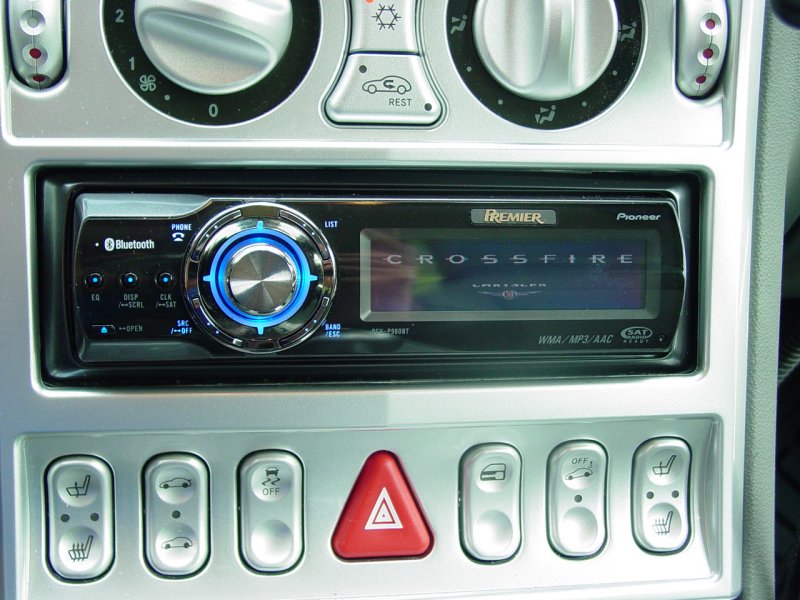
See my write-up for a Pioneer DEH-P980BT with several IP-Bus components added, as well as additional rear speakers and sub.
More here (click)...
Alternatively, you can buy the harness plug and read through the web site here. Basically you wire the harness plug onto the wires coming out of your new head unit (possibly swapping the red and yellow wires) and plug it into the factory socket in the dash and you're good to go.
If you decide to add speakers, sub-woofers, amps, etc. (I did) you can leave the factory connections (I did) and use the additional plugs on your new head unit (if you have any) to run outputs to amps, speakers, subs, remote power-on to amps and subs.
See my write-up for a Pioneer DEH-P980BT with several IP-Bus components added, as well as additional rear speakers and sub.
More here (click)...
Forum Regular
Joined: Sep 2008
Posts: 334
Likes: 0
Re: New Radio!!!
I wish the new poineer, had more functions like the older versions. I find myself having to use the remote to change settings. But I'll get used to it. chris
Originally Posted by ppro
You can run your new head unit through the factory amp and speakers if you want. As has been stated, Crutchfield provides the necessary harness plug (Schosche VW-1B) that you can buy anywhere for $7 and good instructions for the Crossfire (which you can get here for free). You will pay list price for their admittedly superb customer service and one-stop shopping.
Alternatively, you can buy the harness plug and read through the web site here. Basically you wire the harness plug onto the wires coming out of your new head unit (possibly swapping the red and yellow wires) and plug it into the factory socket in the dash and you're good to go.
If you decide to add speakers, sub-woofers, amps, etc. (I did) you can leave the factory connections (I did) and use the additional plugs on your new head unit (if you have any) to run outputs to amps, speakers, subs, remote power-on to amps and subs.
See my write-up for a Pioneer DEH-P980BT with several IP-Bus components added, as well as additional rear speakers and sub.
More here (click)...
Alternatively, you can buy the harness plug and read through the web site here. Basically you wire the harness plug onto the wires coming out of your new head unit (possibly swapping the red and yellow wires) and plug it into the factory socket in the dash and you're good to go.
If you decide to add speakers, sub-woofers, amps, etc. (I did) you can leave the factory connections (I did) and use the additional plugs on your new head unit (if you have any) to run outputs to amps, speakers, subs, remote power-on to amps and subs.
See my write-up for a Pioneer DEH-P980BT with several IP-Bus components added, as well as additional rear speakers and sub.
More here (click)...
Forum Regular
Joined: Sep 2007
Posts: 963
Likes: 2
Re: New Radio!!!
Originally Posted by 07bluezx14
I wish the new poineer, had more functions like the older versions. I find myself having to use the remote to change settings. But I'll get used to it. chris
When you push in on the main ****, you have Function, Entertainment, or Audio. Each is context-sensitive, which means the options beneath are applicable to the currently selected source. I have a number of options there for each of my sources (AM/FM, CD, iPod, XM, HD Radio, USB, BT Audio, Phone, Aux (my "guest" 3.5mm stereo plug for passenger device). There's room for one more AUX device, TV, and a CD-Changer. I can't imagine having more options.
I haven't taken my remote out of the case except to make sure it worked!
One thing I figured out was that if you switch to Phone, it pauses whatever you're listing to which makes it easy to pause something even if you don't want to really use the phone - and it pauses when a call comes it, so that's nice.
The menus do get a little deep so often cannot mess with them while rolling. I kind of miss the old EQ's that used to be bolted to the dash with the 16 little sliders - it was easier to adjust without looking at them than the display version that this unit has - but at least it has it!
Forum Regular
Joined: Sep 2008
Posts: 334
Likes: 0
Re: New Radio!!!
it just seemed much easier to access functions a couple of years ago. I have stuck with pioneer for three headunits, and this one definately takes more patients. I would also like to mention the cd that comes with it instead of a manual. guess you have to learn with the times. chris


Forum Regular
Joined: Sep 2007
Posts: 963
Likes: 2
Re: New Radio!!!
Originally Posted by Veloce
How does that thing show the Chyrsler Crossfire logo?
BTW, I've been to your website. Very informative as well as intimidating.
BTW, I've been to your website. Very informative as well as intimidating.
What part of the site is intimidating? Curious to know in case there's a way to make it better.
Forum Regular
Joined: Sep 2007
Posts: 963
Likes: 2
Re: New Radio!!!
Originally Posted by Veloce
intimidating only in a sense that I marvel at all you've done. It's a compliment!
Can you make the *.jpg available?
Can you make the *.jpg available?

Thread
Thread Starter
Forum
Replies
Last Post
Selbyl
WTB - Items/Parts Wanted to Buy - Archive
2
Sep 26, 2015 04:15 AM
Currently Active Users Viewing This Thread: 1 (0 members and 1 guests)