


Eng cover mod


Thread Starter
|
Senior Member
Joined: May 2008
Posts: 10,460
Likes: 159
From: Cincinnati ( Delhi )
 Eng cover mod
Well the first step was easy. A litttle scuffing, priming, and then paint. I have some 'powered by MB' emblems on the way. Then I will decide to silver paint the CROSSFIRE back on the cover.
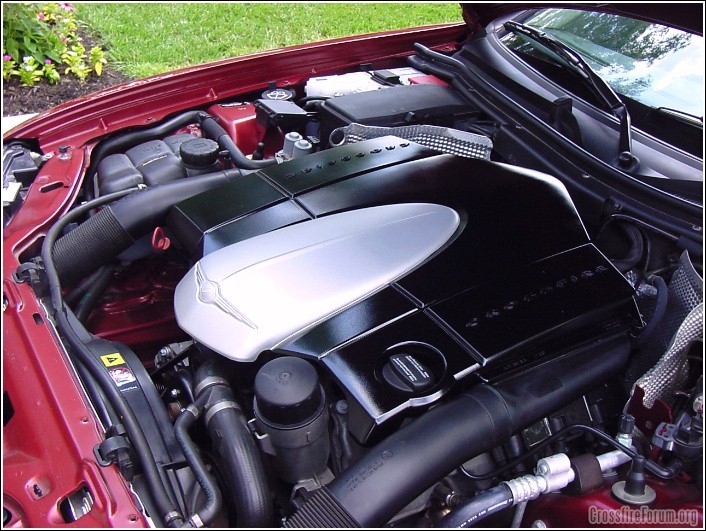
But I still need some ideas for this emblem. I don't like it just embossed silver. And there is no way I can hand paint this myself. I am open for suggestions, pics, etc...
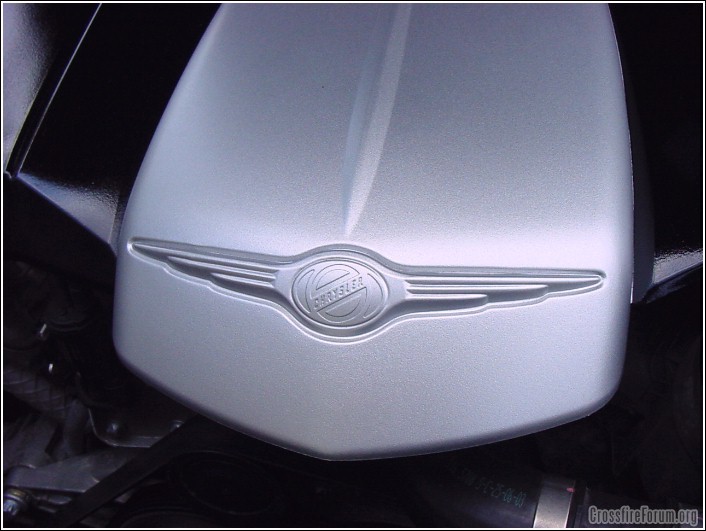
Thanks, James
But I still need some ideas for this emblem. I don't like it just embossed silver. And there is no way I can hand paint this myself. I am open for suggestions, pics, etc...
Thanks, James
Thread Starter
|
Senior Member
Joined: May 2008
Posts: 10,460
Likes: 159
From: Cincinnati ( Delhi )
Re: Eng cover mod
I was going to do it in black wrinkle paint. I bought some and tried it on a test piece of metal. The texture turned out exactly what I wanted. It looked really good.
But after 3 days of drying, in the sun, in shade, in the air condition, you could still peel it up with your finger nail. Anyone have any expierence with Krylon Wrinkle black? I followed the directions exactly.
James
But after 3 days of drying, in the sun, in shade, in the air condition, you could still peel it up with your finger nail. Anyone have any expierence with Krylon Wrinkle black? I followed the directions exactly.
James

Senior Member
Joined: Sep 2007
Posts: 8,014
Likes: 14
From: MOFN, AL, 70 miles from George

 Re: Eng cover mod
Not with Krylon, but I used Rustoleum Hammered and got a very nice result. I used a rustoleum primer first.
Check my gallery.
And I found out the hard way that you can't use say, Krylon primer and then Rustoleum over it-the whole thing curdles.
The emblem can be painted by hand. Use Elmers Paint pens from WalMart Arts/crafts dept. I used the small and medium size of Silver,Gold and Red
Best of luck, it's kind of fun!
Check my gallery.
And I found out the hard way that you can't use say, Krylon primer and then Rustoleum over it-the whole thing curdles.
The emblem can be painted by hand. Use Elmers Paint pens from WalMart Arts/crafts dept. I used the small and medium size of Silver,Gold and Red
Best of luck, it's kind of fun!
Last edited by maxcichon; Jul 12, 2008 at 01:17 PM.
Thread Starter
|
Senior Member
Joined: May 2008
Posts: 10,460
Likes: 159
From: Cincinnati ( Delhi )
Re: Eng cover mod
I used a silver paint pen to high-light the CROSSFIRE as suggested above. Applied the emblems. Now to get the front emblem from Brian and I will be set. In a few weeks I may rub some polish compound on it. James


 Re: Eng cover mod

Joined: Dec 2007
Posts: 41
Likes: 1
From: Yorktown, VA
Re: Eng cover mod
James,
I like what you did to your engine cover and would like to do the same to mine. I have a 2007 Red Roadster. What type of paint did you use and where did you get the "Powered by Mercedes-Benz" emblems? I haven't yet tried to pop off the cover to see how it's done. What is the easy way to pop it off?
Thanks.
Brian (not the Brian in your thread!)
I like what you did to your engine cover and would like to do the same to mine. I have a 2007 Red Roadster. What type of paint did you use and where did you get the "Powered by Mercedes-Benz" emblems? I haven't yet tried to pop off the cover to see how it's done. What is the easy way to pop it off?
Thanks.
Brian (not the Brian in your thread!)

Joined: Nov 2007
Posts: 150
Likes: 1
From: San Diego
Re: Eng cover mod
Originally Posted by James1549
Well the first step was easy. A litttle scuffing, priming, and then paint. I have some 'powered by MB' emblems on the way. Then I will decide to silver paint the CROSSFIRE back on the cover.
But I still need some ideas for this emblem. I don't like it just embossed silver. And there is no way I can hand paint this myself. I am open for suggestions, pics, etc...
Thanks, James
But I still need some ideas for this emblem. I don't like it just embossed silver. And there is no way I can hand paint this myself. I am open for suggestions, pics, etc...
Thanks, James
I first lightly scuffed the emblem being careful not to remove any material and not the damage the surface (5 minutes) then used masking tape on the outline, then applied news paper around it, about a 3 feet out from the emblem to protect the rest of the engine compartment (10 minutes). Panted the whole emblem silver chrome metallic (5 minutes) 3 light coats. I let that dry for about 12 hours. Then masked off just the oval center CHRYSLER badge (5 minutes), spray-painted it gold metallic (5 minutes) 2 light coats. I left the hood up for the whole process, about 19 hours. I do not plan to go further on the lettering, I like it the way it is.
Last edited by Fired UP; Jul 28, 2008 at 07:14 AM.

Forum Regular

Joined: Dec 2007
Posts: 696
Likes: 1
From: Spartanburg,S.C.
Re: Eng cover mod
Originally Posted by buff5
how Do You Remove The Engine Cover?????????
step two there is a little switch under the hood that can now be accessed to comepletely allow the hood to open
step three take off the 2 front platic intake tubes, they just slip right off
step four grab the intake box and pick it up, there are no screws, bolts, etc.. just lift

Joined: Nov 2007
Posts: 85
Likes: 3
Re: Eng cover mod
Thanks much, hood opening , no problem, been a auto dealer for 40 years, been sort of retired for 3 years now tho, & a mechanic for 55 years BUT I am just learning my GERMAN crossfire mechancis etc!!!!!, did not want to "mess up", my new crossfire cover by yanking & breaking something. Thanks much for your prompt reply as I intend to "customize" it also. Aero Blue 2006 Limited, loaded Roadster with the two-Tone Eggshell & dark Grey interior, automatic, soon to be "lighted sill plates", & a windscreen, with now 5000 miles, LOVE the car, what a HOOT!


Joined: May 2006
Posts: 109
Likes: 0
From: calgary alberta
Re: Eng cover mod
To help get around those pain in the butt letters I used a little grease of some kind then paint and wipe off the grease after worked like a charm.I bought an extra cover just to fool around with.
Joined: Nov 2007
Posts: 150
Likes: 1
From: San Diego
Re: Eng cover mod
Originally Posted by James1549
Just can't get the right light conditions to make it look as good as it does in person...
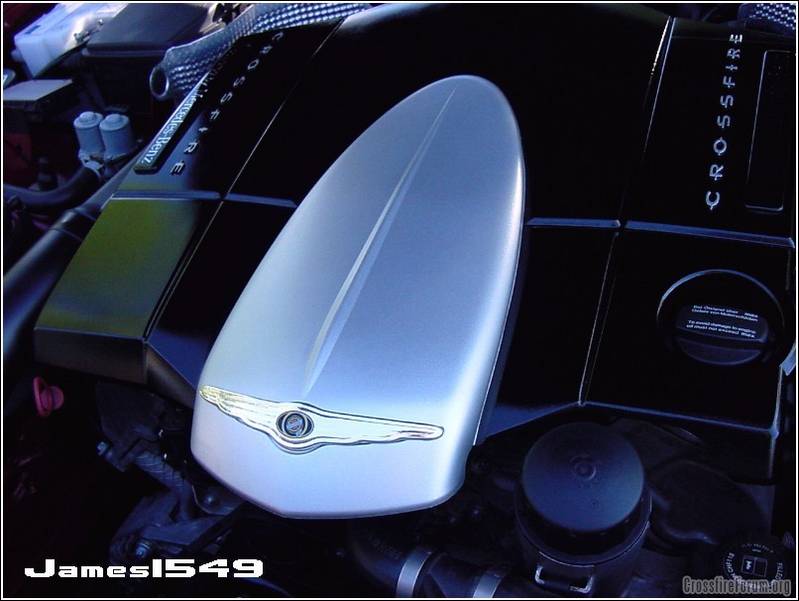
Thanks again Brian,
James
Thanks again Brian,
James
Is that an SRT6 Engine cover emblem?
It looks to be just a little smaller then the embossed stamped plastic emblem underneath. Is that correct or is it just the picture.
Thread Starter
|
Senior Member
Joined: May 2008
Posts: 10,460
Likes: 159
From: Cincinnati ( Delhi )
Re: Eng cover mod
The emblem is pleny wide, just a tad short on the height. I don't know why it shows up so bad on camera, but in person it is hardly noticable. I think you are seeing some reflection making it look worse. Yes it is an emblem from an SRT cover.
James
James

Senior Member
Joined: Jul 2007
Posts: 7,951
Likes: 9
From: Dallas, the Republic of Texas
Re: Eng cover mod
Originally Posted by James1549
The emblem is pleny wide, just a tad short on the height. I don't know why it shows up so bad on camera, but in person it is hardly noticable. I think you are seeing some reflection making it look worse. Yes it is an emblem from an SRT cover.
James
James

Thread Starter
|
Senior Member
Joined: May 2008
Posts: 10,460
Likes: 159
From: Cincinnati ( Delhi )
Re: Eng cover mod
Paul, no such number. My Chrysler/Dodge parts buddy did some extensive searching for that part for me. You must purchase the entire cover for $150+ just to get the emblem.
With no luck at the dealer, Brian on this forum sent it to me since he didn't use his anymore.
James
With no luck at the dealer, Brian on this forum sent it to me since he didn't use his anymore.
James

