Originally Posted by
rcompart
Easiest way to disable it is to remove the wire from pin 2 (red highlight) and put it in the empty place of pin 6 (blue highligh). This will completely disable it and you will no longer have the light illuminate on the instrument cluster. This will not affect the HomeLink in any way so you don't lose that functionality.
********************* ATTENTION!!!!! *********************
The highlight colors are NOT the wire colors. They are only there to highlight where the pin is from the factory and where its to go to disable the TPMS. The ONLY wire being changed is the grey wire with the yellow stripe (20GY/YL).
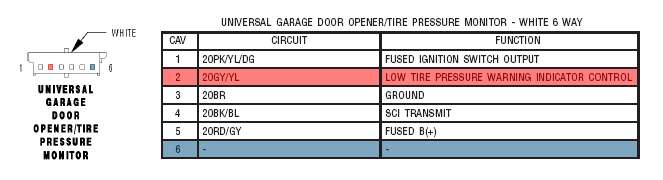
To get at the TPMS/HomeLink connector, just remove the dome light and you can see the wires going into it. Remove the connector, use a pick or other fine tipped tool and depress the top of pin 2 so it will slide out. Push the pin back into the connector in the 6th position and reinstall the connector. Reinstall the dome light and you are finished.
Awesome, I'll need to do this.
Thanks