Old Mar 12, 2023 | 11:19 AM
  #109 (permalink)  
Bayukbros's Avatar
Bayukbros
Joined: Apr 2015
Posts: 65
Likes: 1
From: Raleigh, N.C.
Default Re: How can I disable the TPMS? (Tire Pressure Monitoing System)

Originally Posted by rcompart
Easiest way to disable it is to remove the wire from pin 2 (red highlight) and put it in the empty place of pin 6 (blue highligh). This will completely disable it and you will no longer have the light illuminate on the instrument cluster. This will not affect the HomeLink in any way so you don't lose that functionality.
********************* ATTENTION!!!!! *********************
The highlight colors are NOT the wire colors. They are only there to highlight where the pin is from the factory and where its to go to disable the TPMS. The ONLY wire being changed is the grey wire with the yellow stripe (20GY/YL).
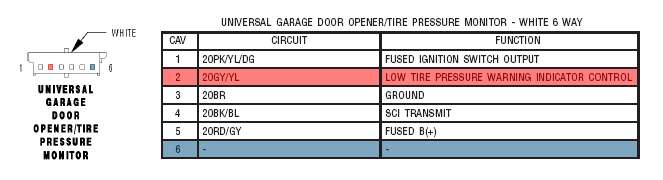
To get at the TPMS/HomeLink connector, just remove the dome light and you can see the wires going into it. Remove the connector, use a pick or other fine tipped tool and depress the top of pin 2 so it will slide out. Push the pin back into the connector in the 6th position and reinstall the connector. Reinstall the dome light and you are finished.
I have tried to do this; '06 Roadster; got the dome light down and the only connector attached to it was black in color; only three wires in the connector with five positions; the number one and five being blank. Positions two, three, four with wires; attempted to
pull wire two out without success; I do not see a pin to depress for the wire to slide out ? The color of number two wire is light brown ? Got
frustrated and subsequently put everything back together ... now in this thread I see ( and indicated orig. the connector is ' white ' ? )
did not see a white connector with a grey/ yellow striped wire. Was it tucked forward towards the homelink / garage part ? Answers please ... I'm willing to try again to get that annoying icon on the dash to go out ... thanks bauukbros in RDU
 
Reply