


From Prototype to Production...


Thread Starter
|
Forum Regular
Joined: Sep 2007
Posts: 963
Likes: 2
 From Prototype to Production...
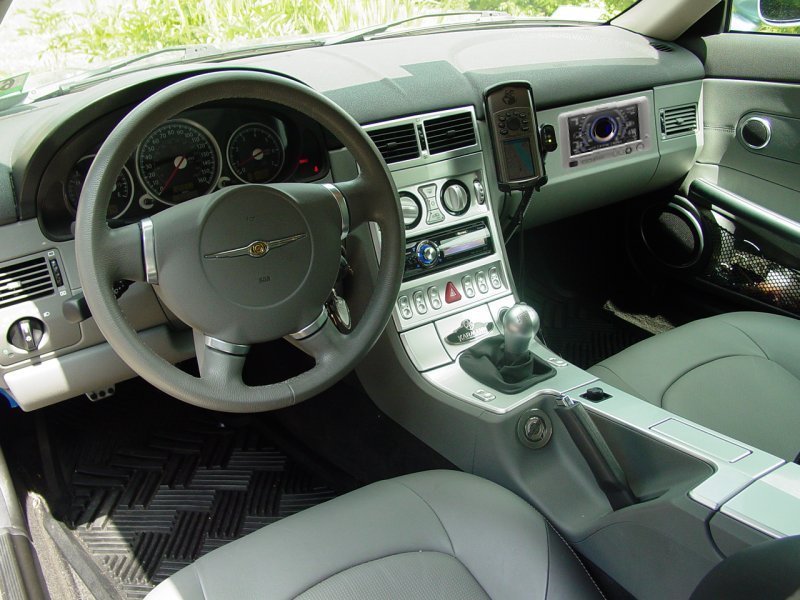
The Crossfire Prototype had the Electronic Vehicle Information Center (EVIC) to measure such factors as acceleration, lap time and g-forces. (the EVIC is above glove box on passenger side)
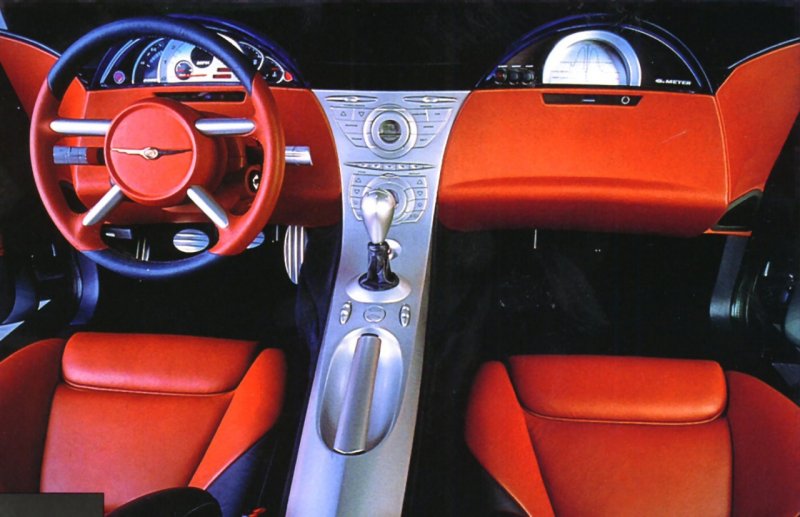
Crossfire Prototype with Electronic Vehicle Information Center (EVIC)
I found a product that offers the same features - the Pioneer AVG-VDP1 Vehicle Dynamics Processor. It is combined with the Pioneer AVD-W6210 - 6½" Detachable Touch Panel Widescreen LCD Color Display (which also supports a rear-view camera) to give the same capabilities as found in the prototype.
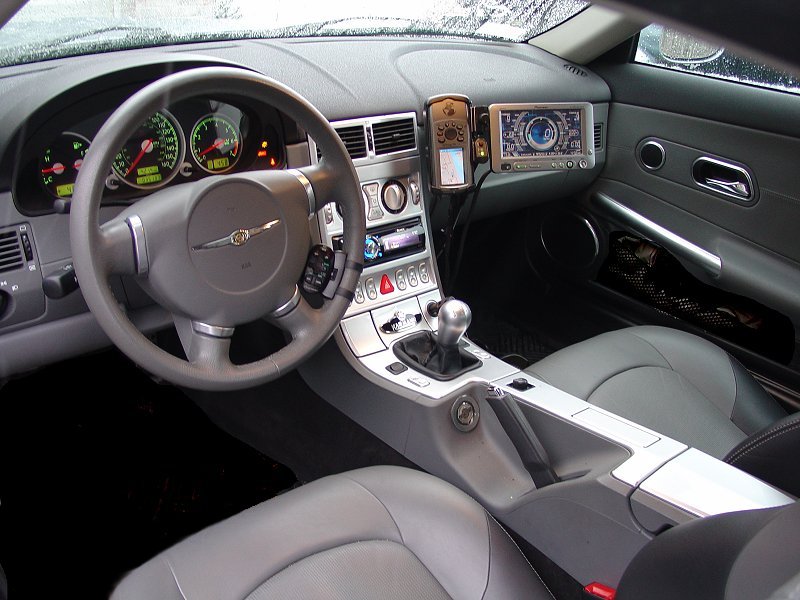
Click here to learn more...
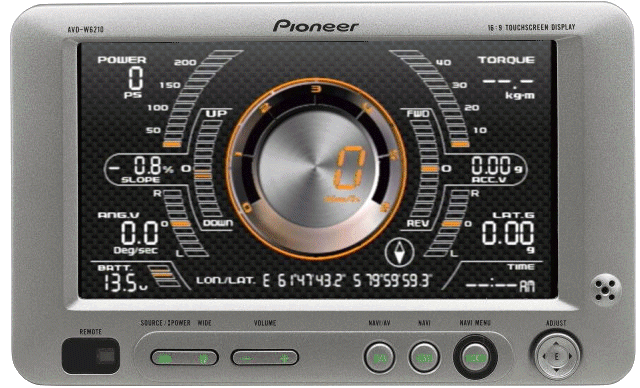
Crossfire Prototype with Electronic Vehicle Information Center (EVIC)
I found a product that offers the same features - the Pioneer AVG-VDP1 Vehicle Dynamics Processor. It is combined with the Pioneer AVD-W6210 - 6½" Detachable Touch Panel Widescreen LCD Color Display (which also supports a rear-view camera) to give the same capabilities as found in the prototype.
Click here to learn more...
Last edited by ppro; Feb 14, 2009 at 03:15 PM.

Thread Starter
|
Forum Regular
Joined: Sep 2007
Posts: 963
Likes: 2
Re: From Prototype to Production...
Originally Posted by Moparrbust
What's that round thing near your e-brake??
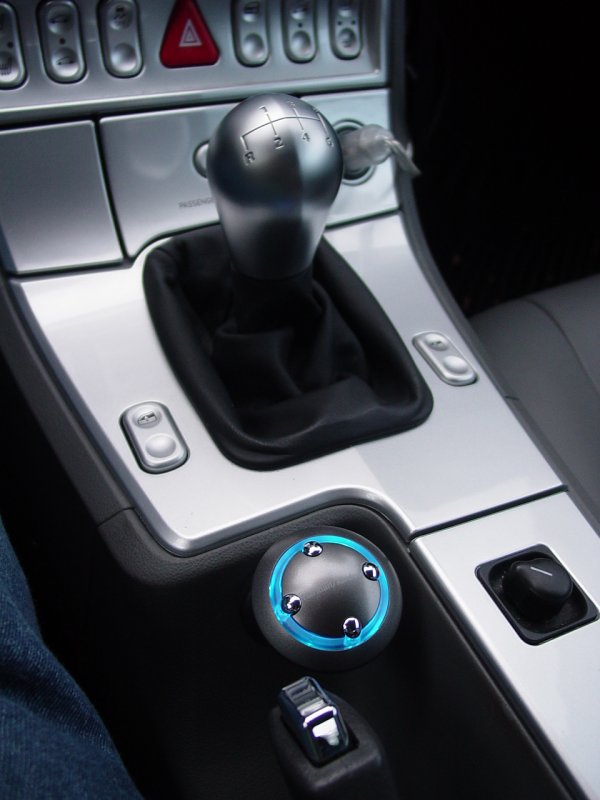
The control **** for the iPod was mounted there with the wire coming through the console and into the **** from behind. The mounting pod was a 90-degree affair that mounted where now the emblem is located.

Senior Member
Joined: Jul 2007
Posts: 7,951
Likes: 9
From: Dallas, the Republic of Texas
 Re: From Prototype to Production...
That's pretty cool. But the last thing I want is the speed I'm going right in front of my wife. 
Originally Posted by ppro
The Crossfire Prototype had the Electronic Vehicle Information Center (EVIC) to measure such factors as acceleration, lap time and g-forces. (the EVIC is above glove box on passenger side)
Crossfire Prototype with Electronic Vehicle Information Center (EVIC)
I found a product that offers the same features - the Pioneer AVG-VDP1 Vehicle Dynamics Processor. It is combined with the Pioneer AVD-W6210 - 6½" Detachable Touch Panel Widescreen LCD Color Display (which also supports a rear-view camera) to give the same capabilities as found in the prototype.
Click here to learn more...
Crossfire Prototype with Electronic Vehicle Information Center (EVIC)
I found a product that offers the same features - the Pioneer AVG-VDP1 Vehicle Dynamics Processor. It is combined with the Pioneer AVD-W6210 - 6½" Detachable Touch Panel Widescreen LCD Color Display (which also supports a rear-view camera) to give the same capabilities as found in the prototype.
Click here to learn more...
Thread Starter
|
Forum Regular
Joined: Sep 2007
Posts: 963
Likes: 2
Re: From Prototype to Production...
Originally Posted by MI6_007
That's pretty neat. Is it only $265?
Originally Posted by [b
InfernoRedXfire][/b]That's pretty cool. But the last thing I want is the speed I'm going right in front of my wife.
That's the good thing - you can configure what data you want displayed, so if you don't want speed showing, you can put up the G-force, GPS, HP, Torque, etc...
 Re: From Prototype to Production...
Originally Posted by ppro
The "black box" is $265. The kicker is the monitor - ~$400 for the touch screen (necessary to operate the settings on the black box...)
That's the good thing - you can configure what data you want displayed, so if you don't want speed showing, you can put up the G-force, GPS, HP, Torque, etc...
That's the good thing - you can configure what data you want displayed, so if you don't want speed showing, you can put up the G-force, GPS, HP, Torque, etc...
Does it work with any headunit that has video in? I have a Kenwood in-dash and this would be pretty cool!

Forum Regular
Joined: Nov 2008
Posts: 469
Likes: 0
From: Brenham, Texas
Re: From Prototype to Production...
Originally Posted by ppro
The "black box" is $265. The kicker is the monitor - ~$400 for the touch screen (necessary to operate the settings on the black box...)
That's the good thing - you can configure what data you want displayed, so if you don't want speed showing, you can put up the G-force, GPS, HP, Torque, etc...
That's the good thing - you can configure what data you want displayed, so if you don't want speed showing, you can put up the G-force, GPS, HP, Torque, etc...
 Still neat though

Senior Member
Joined: Mar 2008
Posts: 14,607
Likes: 39
From: IN
Re: From Prototype to Production...
So, for $700, I can have a sterio, back-up camera, and an info center?....I think I will look into to this. Any info on how accurate it is, or are you running this set-up now?....
Thread Starter
|
Forum Regular
Joined: Sep 2007
Posts: 963
Likes: 2
Re: From Prototype to Production...
Originally Posted by nox1s
Does it work with any headunit that has video in? I have a Kenwood in-dash and this would be pretty cool!
Originally Posted by From the manual:
"The AVG-VDP1 permits touch panel operation in conjunction with Pioneer touch-screen Audio/Video displays with a 26-Pin RGB Input, including AVH-P6800DVD, AVH-P5700DVD, AVX-P8DVD and AVD-W6210 as well as older Pioneer models such as AVH-P7600DVD, AVH-P7500DVD, AVH-P6600DVD, and AVH-P6500DVD. (Note: Not compatible with Pioneer Navigation Systems, such as AVIC-Z1, AVIC-N3, AVIC-N2, AVIC-D2, AVIC-D1 or AVIC-N1)"
Thread Starter
|
Forum Regular
Joined: Sep 2007
Posts: 963
Likes: 2
Re: From Prototype to Production...
Originally Posted by oledoc2u
So, for $700, I can have a sterio, back-up camera, and an info center?....I think I will look into to this. Any info on how accurate it is, or are you running this set-up now?....
AVG-VDP1 (unit) - List: ~$400 - Sell: ~$270
AVD-W6310 (display) - List: $750 - Sell: ~$400
ND-BC2 (rear camera) - List: $250 - Sell: ~$170
Glove Box - ~$100 (to hog out to install the video display, leaving original one to restore to factory if remove system)
So conservative estimate is about $940 to get it done cleanly and be able to go back to stock if you sell the car. About $100 less if you make it "permanent". I went the used route and got the display and the box for about half that.
As for accuracy,
Gyro and G-Force - I don't have a way to verify the gyro and g-force readings but I have not (yet) been able to pull the maximum g's our car was rated by Road & Track (.98) - which makes sense - it's winter, it's icy, and there's no place to test this.
Accelerometer - same thing - no way to verify. But it does give a read-out which is proportional to the speed with which I accelerate. Not scientific but again it's winter here.
Speed - accurate
GPS - this is a basic feature - it gives your current position and the capability to enter a coordinate then report "as crow flies" distance and ETA, which as we know is about 10 years out of date for current navigation system technology - but they don't advertise it as a Navigation system, so it simply gives what amounts to a rough ETA - which is why I run my Garmin Map76csx for navigation and to-the-minute ETA. The AVD-W6210 display just constantly updates the present position coordinate so it's a constantly changing number. Reminds me of the Aston Martin in Gold Finger...
Torque and HP - no way to verify without a dyno run - but again, the numbers I'm getting don't exceed what the car is spec'd so it's at least in the realm of reason. Generally seeing low-hundreds - because I'm driving on the street and not racing from light to light. Probably will see higher numbers if I find a place to go all-out.
Slope and Angle - about right, we have some hilly terrain and the indicator seems to match what the signs say (truck warning signs - we have between 7% and 11% grades all over the place). Most of the roads have banking so that comes into play - harder to verify because if you're traveling the speed the road was designed for, the banking seems flat.
Battery - looks right - sitting at about 12v with the car on ACC and about 13.5 - 14.5v with car running and moving. It should be right - it's attached to the battery...
Time - comes from the GPS so it's as correct as the GPS satellite system...
Overall - It's a nice addition - lots of data - they provide the mechanism to lock-out data review if you're not parked (by checking a parking brake sensor) - that can be overcome since it's just looking for you to set the brake twice before you run through the data, and it has no way of knowing what switch you have it connected to... Of course the speed sensor lead would also need to be low as well... But really it's a lot of menu navigation to review a run so I can't see myself leaning all the way over there while driving and doing it. My wife already has issues with the little bit of fumbling I do with the GPS... (we went from "Why don't you stop and ask for directions!" to "would you stop fooling around with the GPS!"...)
I have not done the rear-camera yet but once my play money recharges I am pretty sure that's my next stop...
Senior Member
Joined: Mar 2008
Posts: 14,607
Likes: 39
From: IN
Re: From Prototype to Production...
I am interested in this setup...I love the idea of a built in back up camera, can't see squat when the top is up. Never liked my Nav/Radio...the info center would be helpful, even if it is just close...thanks, man, I will see what we can do with this...If you have more info where to purchase, install, let me know...nice mod...
Thread Starter
|
Forum Regular
Joined: Sep 2007
Posts: 963
Likes: 2
Re: From Prototype to Production...
Originally Posted by oledoc2u
I am interested in this setup...I love the idea of a built in back up camera, can't see squat when the top is up. Never liked my Nav/Radio...the info center would be helpful, even if it is just close...thanks, man, I will see what we can do with this...If you have more info where to purchase, install, let me know...nice mod...
I put together the wiring diagram for the Vehicle Dynamics Processor and the monitor - showing all the connections into the car. It's a real eye-chart...
Use the bottom and side scroll-bars in this posting to see the whole thing - the upper left is empty so you will have to scroll to see it...
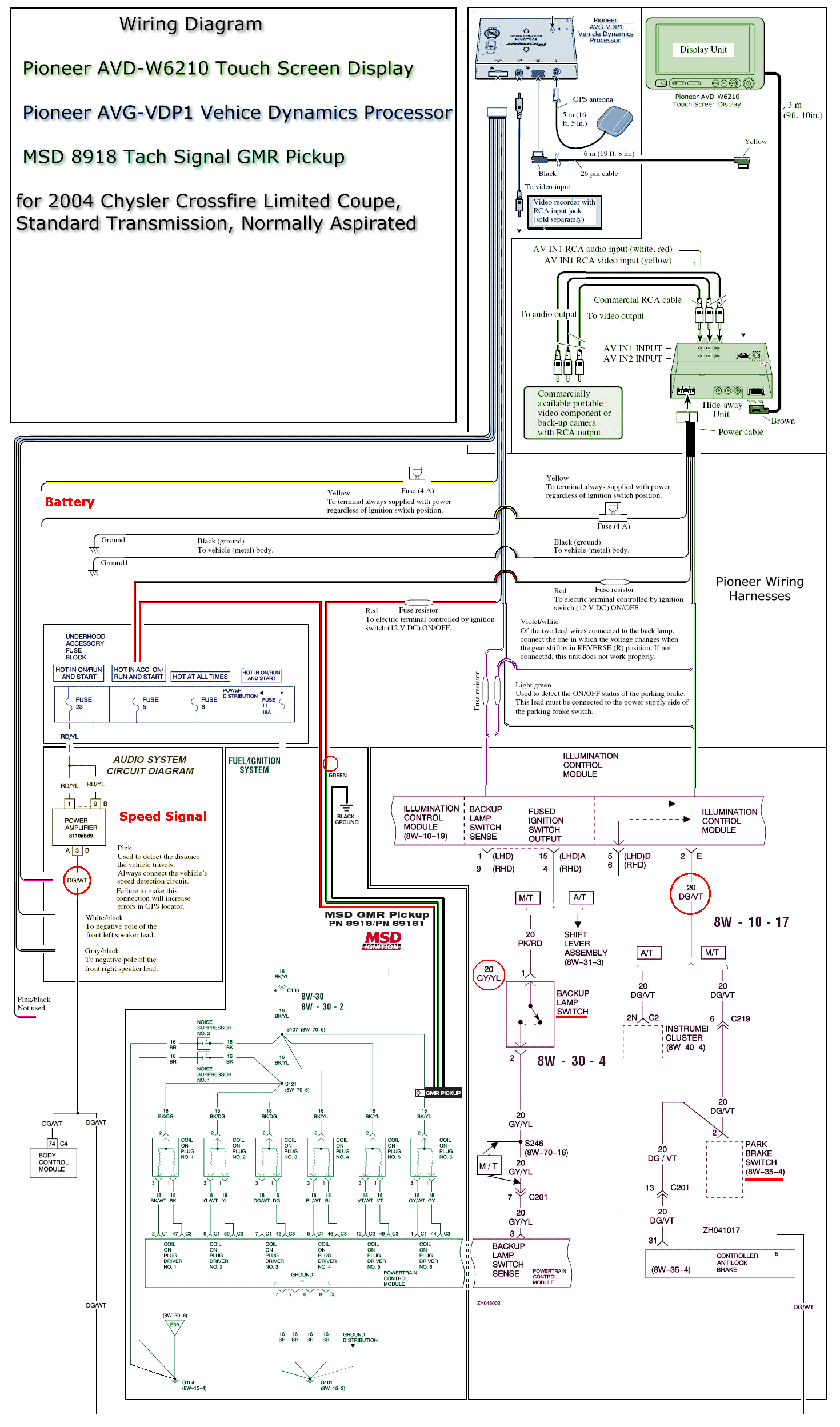
Click to download the PDF (there's a link below the illustration on the write-up page...

Joined: Jun 2008
Posts: 8
Likes: 0
Re: From Prototype to Production...
Thread Starter
|
Forum Regular
Joined: Sep 2007
Posts: 963
Likes: 2
Re: From Prototype to Production...
I continue to update the page that documents the install of the Pioneer Vehicle Dynamics Processor. This has been an interesting project...
More (click)
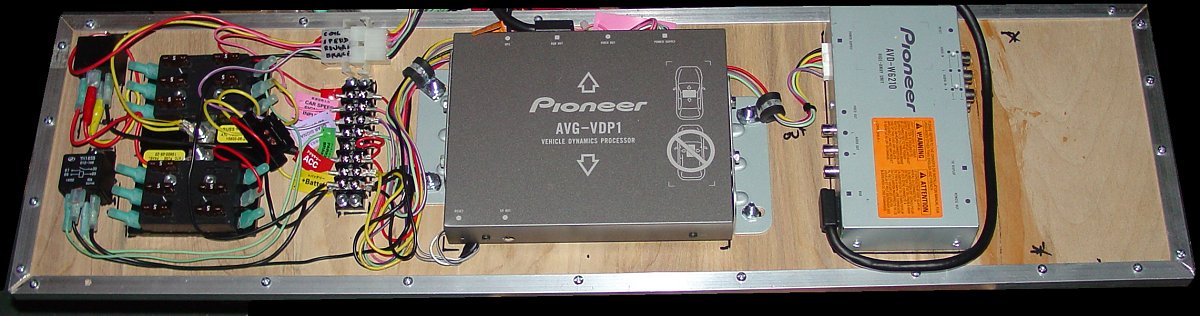
This photo shows the layout of the fuse panels, relays (one controls power to the fuse panel that is active when the car runs, the other controls the signal for the handbrake because I didn't want to wire it to the brake), the barrier strip where I consolidated redundant wires shared by both units, and the connector I made to enable easily removing the entire assembly from the car (to use the jack and tire repair supplies).
I left room on the right and in the harness connector to add the rear-view camera controller...
More (click)
This photo shows the layout of the fuse panels, relays (one controls power to the fuse panel that is active when the car runs, the other controls the signal for the handbrake because I didn't want to wire it to the brake), the barrier strip where I consolidated redundant wires shared by both units, and the connector I made to enable easily removing the entire assembly from the car (to use the jack and tire repair supplies).
I left room on the right and in the harness connector to add the rear-view camera controller...

Thread Starter
|
Forum Regular
Joined: Sep 2007
Posts: 963
Likes: 2
Re: From Prototype to Production...
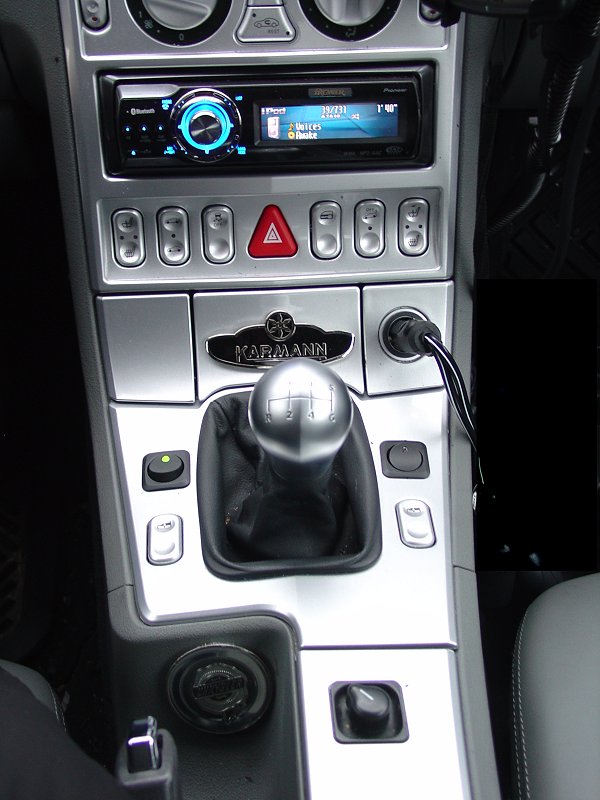
I added some switchgear so that I can gain access to menus while moving, and to activate the rear-view camera when on the move.
Click for more...
Click for more...


Thread Starter
|
Forum Regular
Joined: Sep 2007
Posts: 963
Likes: 2
Re: From Prototype to Production...
Originally Posted by JimmySkullz
Very Cool!! Is it worth all the work?

But yeah, I think it was worth it. I went in to the auto parts store today to get a thermal-activated switch for the fan I plan to put in the compartment. The guy in the store didn't understand so I showed him. His eyes bugged out. I don't think he gets out much...
Today I made a movie to highlight the features.
I was parked in my driveway, ran through some screens and replayed part of a session that I recorded a little earlier. There's lots more than the video shows but it gives you an idea.
Here's the video (broadband required - 53MB) - Click the picture to view it (right click and "Save Target As..." to save it and view offline.)

Write Up (Click)
Last edited by ppro; Feb 15, 2009 at 07:17 PM.