


Hands Free / Bluetooth Phone Setup in Roadster


Thread Starter
Joined: Feb 2009
Posts: 147
Likes: 1
 Hands Free / Bluetooth Phone Setup in Roadster
Has anyone tried installing a bluetooth hands free kit in their roadster? I was curious if it was worth it. I drive with the top down most of the time and I can not use my iphone due to the wind noise even though I have a wind deflector in the back.
One stereo installer dude told me that if I install the mic up by the windshield on the dash that I could probably use the phone pretty well with a bluetooth system since the sound will come out of the speakers making it easier for me to hear people and the mic would not be in the wind so they would not get the annoying wind noise on their end.
I am thinking about upgrading from my Kenwood KIV-701 that I just installed to a KIV-901BT in order to get the built in bluetooth for another $70 or so.
Thanks,
Xfirecrazy
One stereo installer dude told me that if I install the mic up by the windshield on the dash that I could probably use the phone pretty well with a bluetooth system since the sound will come out of the speakers making it easier for me to hear people and the mic would not be in the wind so they would not get the annoying wind noise on their end.
I am thinking about upgrading from my Kenwood KIV-701 that I just installed to a KIV-901BT in order to get the built in bluetooth for another $70 or so.
Thanks,
Xfirecrazy


Joined: Sep 2011
Posts: 98
Likes: 0
Re: Hands Free / Bluetooth Phone Setup in Roadster
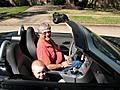
I'll send you a picture of mine tomorrow. Just had it installed on Saturday. I made two calls with it today while doing 75 with the top down. I could hear just fine and my wife on the other end said that while it wasn't quite as crystal clear as my bluetooth earpiece (with noise cancellation) that she found it perfectly acceptable. In fact she was surprised to find I was on the freeway. The installer mounted the mike on the top edge of the windshield pillar.
Senior Member
Joined: Nov 2008
Posts: 1,577
Likes: 1
From: Houston, Texas
 Re: Hands Free / Bluetooth Phone Setup in Roadster
I bought one hat plugs into Cig lighter. It does Blue tooth and has FM trans that streams music from my phone to the radio. works good. hands free is good, loud enough, plus I like being able to have the music. Bought off ebay, cost about $50. i bought another one but it did not work as well, but it was $12.
Joined: Sep 2011
Posts: 98
Likes: 0
Re: Hands Free / Bluetooth Phone Setup in Roadster
If you are simply adding BT to your roadster I'd suggest you buy a good BT ear piece instead. Something like the Jawbone Icon which has great noise cancellation. On the other hand, if you have a radio that supports BT and you are simply adding on to that then I think you'll be surprised how well it works.
My Jawbone gives a better sounding signal back to the other party than the BT that I just had hooked up to my new Kenwood. However, if I use the Kenwood instead of the Jawbone it means that my radio will automatically mute when a call comes in. Also, I find it easier to talk to my passenger if I dont' have something stuffed in my ear.
As I mentioned earlier, when the installer put the Kenwood in on Saturday he mounted the BT mike on the windshield pillar. Here is a photo. It doesn't seem to pick up much road noise, even at freeway speeds with the top down.
My Jawbone gives a better sounding signal back to the other party than the BT that I just had hooked up to my new Kenwood. However, if I use the Kenwood instead of the Jawbone it means that my radio will automatically mute when a call comes in. Also, I find it easier to talk to my passenger if I dont' have something stuffed in my ear.
As I mentioned earlier, when the installer put the Kenwood in on Saturday he mounted the BT mike on the windshield pillar. Here is a photo. It doesn't seem to pick up much road noise, even at freeway speeds with the top down.

Forum Regular
Joined: May 2011
Posts: 763
Likes: 0
From: Meridian Idaho
Re: Hands Free / Bluetooth Phone Setup in Roadster
Originally Posted by KelloggKid
If you are simply adding BT to your roadster I'd suggest you buy a good BT ear piece instead. Something like the Jawbone Icon which has great noise cancellation. On the other hand, if you have a radio that supports BT and you are simply adding on to that then I think you'll be surprised how well it works.
My Jawbone gives a better sounding signal back to the other party than the BT that I just had hooked up to my new Kenwood. However, if I use the Kenwood instead of the Jawbone it means that my radio will automatically mute when a call comes in. Also, I find it easier to talk to my passenger if I dont' have something stuffed in my ear.
As I mentioned earlier, when the installer put the Kenwood in on Saturday he mounted the BT mike on the windshield pillar. Here is a photo. It doesn't seem to pick up much road noise, even at freeway speeds with the top down.
My Jawbone gives a better sounding signal back to the other party than the BT that I just had hooked up to my new Kenwood. However, if I use the Kenwood instead of the Jawbone it means that my radio will automatically mute when a call comes in. Also, I find it easier to talk to my passenger if I dont' have something stuffed in my ear.
As I mentioned earlier, when the installer put the Kenwood in on Saturday he mounted the BT mike on the windshield pillar. Here is a photo. It doesn't seem to pick up much road noise, even at freeway speeds with the top down.
Joined: Sep 2011
Posts: 98
Likes: 0
Re: Hands Free / Bluetooth Phone Setup in Roadster
Originally Posted by kjwinston
Is that on the back of a roadster?


Senior Member
Joined: Aug 2010
Posts: 1,756
Likes: 5
From: Maryland (Central)
Re: Hands Free / Bluetooth Phone Setup in Roadster
I just purchased a Bluetooth FM transmitter combo. Hasn't come in yet but it has full functionality for streaming music and calls thru the existing radio. It supports external connections such as IPODs, SanDisks, USB and other devices and has 2 remotes, including one you put on the steering wheel. I'll let you know how it works. Keeping my fingers crossed. BTW, It's silver in color and looks like it will be a close match to the console ....
Link: http://www.ebay.com/itm/Bluetooth-MP...item27bd51715a
Link: http://www.ebay.com/itm/Bluetooth-MP...item27bd51715a
Last edited by PNA; Oct 4, 2011 at 05:52 AM.

Forum Regular
Joined: Oct 2010
Posts: 531
Likes: 3
From: NY City & Orlando, Florida
Re: Hands Free / Bluetooth Phone Setup in Roadster
Check out this link for the FM Transmitter BT that I went with:
https://www.crossfireforum.org/forum...ing-audio.html
After having it for a while, it's okay and I would rate as a B.
My next upgrade would be a BT Radio, probably Kenwood with everything built in.
With the Transmitter I'm still stuck with the Stock Radio, which in my opinion is rated a C for Audio Quality...
https://www.crossfireforum.org/forum...ing-audio.html
After having it for a while, it's okay and I would rate as a B.
My next upgrade would be a BT Radio, probably Kenwood with everything built in.
With the Transmitter I'm still stuck with the Stock Radio, which in my opinion is rated a C for Audio Quality...

Joined: Nov 2007
Posts: 110
Likes: 0
From: Las Vegas, NV
Re: Hands Free / Bluetooth Phone Setup in Roadster
Originally Posted by XFireCrazy
Has anyone tried installing a bluetooth hands free kit in their roadster? I was curious if it was worth it. I drive with the top down most of the time and I can not use my iphone due to the wind noise even though I have a wind deflector in the back.
One stereo installer dude told me that if I install the mic up by the windshield on the dash that I could probably use the phone pretty well with a bluetooth system since the sound will come out of the speakers making it easier for me to hear people and the mic would not be in the wind so they would not get the annoying wind noise on their end.
I am thinking about upgrading from my Kenwood KIV-701 that I just installed to a KIV-901BT in order to get the built in bluetooth for another $70 or so.
Thanks,
Xfirecrazy
One stereo installer dude told me that if I install the mic up by the windshield on the dash that I could probably use the phone pretty well with a bluetooth system since the sound will come out of the speakers making it easier for me to hear people and the mic would not be in the wind so they would not get the annoying wind noise on their end.
I am thinking about upgrading from my Kenwood KIV-701 that I just installed to a KIV-901BT in order to get the built in bluetooth for another $70 or so.
Thanks,
Xfirecrazy
I just installed a Parrot CK3100. I mounted the microphone just forward of the Homelink unit [between unit and windshield]. Sounds great with the top up but bad with the top down and speed over 35mph. I placed my hand near the microphone and could feel a lot of wind turbulence, so it's no wonder that it's noisy. Suggestion would be to tape a few narrow strips of paper around the windshield area, then drive at freeway speed with the top down. I suppose those areas where the paper moves least would be the more ideal spot[s] to place the microphone.
By the way, the Parrot CK3100 is a cinch to install. The harnesses that come with the unit just plug in. Remember to switch the power and ignition wires - just unscrew the fuse holders and swap. The red goes to the orange wire and the orange wire goes to the red wire. It takes about 10 seconds. Also remember that the POWER plug is the lower plug on the radio.

Joined: Nov 2010
Posts: 286
Likes: 1
From: GTA
Re: Hands Free / Bluetooth Phone Setup in Roadster
I use a Motorola T505 in conjunction with my Crossfire Roadster's Nav Radio. When matched to the iPhone and signal sent to the FM channel chosen by the T505 - it works very well I've been told. Too, I think my end sounds just fine... all of that at highway speeds with the top down.
The only issue is that it is a bit of a nuisance if you are listenting to a DVD and a call comes in... fumble with the iPhone yelling out, "Hang on a minute!!!" while you change over to FM and activate the FM transmitter and then press the Bluetooth option on the iPhone. By then 30 seconds have gone by and you just frustrated everyone. I have the unit on its clip on the driver's sunvisor.
That said, if you are already to receive a call and have nothing else playing OR if you have placed the call - then it is perfect. Alot less than buying a new head unit ...
NEW Motorola MotoROKR T505 Bluetooth Car Kit - Iphone 4 - 16/32GB | eBay
The only issue is that it is a bit of a nuisance if you are listenting to a DVD and a call comes in... fumble with the iPhone yelling out, "Hang on a minute!!!" while you change over to FM and activate the FM transmitter and then press the Bluetooth option on the iPhone. By then 30 seconds have gone by and you just frustrated everyone. I have the unit on its clip on the driver's sunvisor.
That said, if you are already to receive a call and have nothing else playing OR if you have placed the call - then it is perfect. Alot less than buying a new head unit ...
NEW Motorola MotoROKR T505 Bluetooth Car Kit - Iphone 4 - 16/32GB | eBay
Last edited by PitMarshall; Jan 10, 2012 at 03:51 PM.
Senior Member
Joined: Nov 2008
Posts: 1,577
Likes: 1
From: Houston, Texas
Re: Hands Free / Bluetooth Phone Setup in Roadster
The mic pickup on mine is in front of the dash mounted radio. Seems to work ok. I can hear my caller well with top up or down. works good with the music player feature as well.

Thread
Thread Starter
Forum
Replies
Last Post
axnguyen
Cars For Sale - Archive
1
Jul 21, 2015 11:41 AM
Dave Wilson
New Member Introductions
3
Jul 18, 2015 05:31 PM
Currently Active Users Viewing This Thread: 1 (0 members and 1 guests)