


Pioneer DEH-P980BT


Thread Starter
|
Forum Regular
Joined: Sep 2007
Posts: 963
Likes: 2
 Pioneer DEH-P980BT
So after wasting time looking for a way to use the AUX pin-outs on the factory Becker/Infinity 6806 head unit, the huge disappointment of FM Modulation (should have known...), I 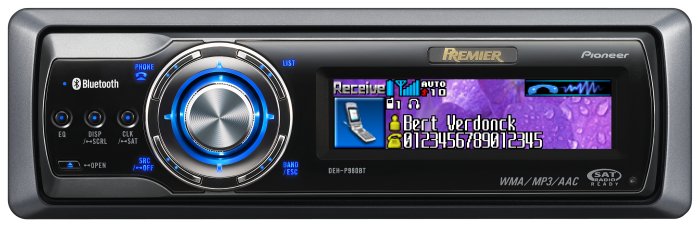
No more AUX input problems.
Here's the write-up
(Click Here)
The info in crossfireforum was invaluable. Using the stock speakers and plan to add another amp and two rear speakers to get full advantage of the various spatial processors in the head unit.
The space under the floor swallowed a huge number of carefully bundled items (harman/kardon Drive+Play controller for the iPod, two new fuse panels, the wire bundle).
Anyway, in a while I will move the Drive+Play to the Jeep, remove the XM bolt-on, and use the Pioneer IP Bus to plug in XM and iPod interfaces (the head unit supports full function of both through the existing display)
For now, this is the final outcome:
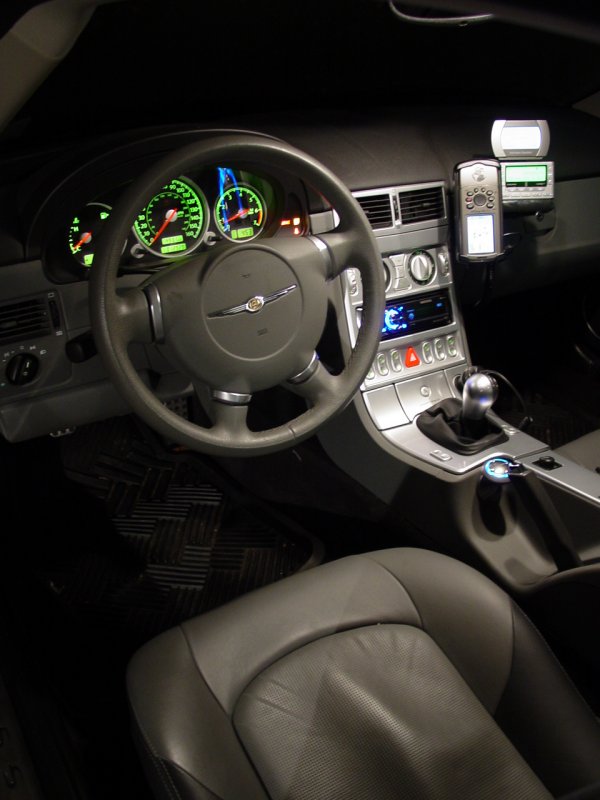
Note the BAS/ESP warning light is lit... That little tidbit was buried in the owners manual... Turns out it comes on and stays on after the battery has been disconnected (or drained). To reset it, simply turn the steering wheel all the way to the left, right, left, right until it goes off. I was all ready for a trip to the dealer but luckily found the fix buried deep in the manual.
No, not going to get an integrated GPS - I upload and download way too much data, and take to the woods way too often to be limited by one of those!
ppro
- ditched the factory head unit
- bought a Schosche VW01B harness adapter
- built a couple new fuse panels (one switched and one unswitched)
- ran some power and ground wires
- plugged in my new head unit with mucho AUX options (mini plug, IP Bus, RCA pre-amp and sub outs, Bluetooth Music and Phone).
No more AUX input problems.
Here's the write-up
(Click Here)
The info in crossfireforum was invaluable. Using the stock speakers and plan to add another amp and two rear speakers to get full advantage of the various spatial processors in the head unit.
The space under the floor swallowed a huge number of carefully bundled items (harman/kardon Drive+Play controller for the iPod, two new fuse panels, the wire bundle).
Anyway, in a while I will move the Drive+Play to the Jeep, remove the XM bolt-on, and use the Pioneer IP Bus to plug in XM and iPod interfaces (the head unit supports full function of both through the existing display)
For now, this is the final outcome:
Note the BAS/ESP warning light is lit... That little tidbit was buried in the owners manual... Turns out it comes on and stays on after the battery has been disconnected (or drained). To reset it, simply turn the steering wheel all the way to the left, right, left, right until it goes off. I was all ready for a trip to the dealer but luckily found the fix buried deep in the manual.
No, not going to get an integrated GPS - I upload and download way too much data, and take to the woods way too often to be limited by one of those!
ppro
Last edited by ppro; Nov 19, 2007 at 07:46 AM.

Thread Starter
|
Forum Regular
Joined: Sep 2007
Posts: 963
Likes: 2
Re: Pioneer DEH-P980BT
Originally Posted by Mike-in-Orange
Sounds interesting, but I'm getting a 404 error with your write up link. Can you correct the link please?


Joined: Aug 2007
Posts: 12
Likes: 0
Re: Pioneer DEH-P980BT
I have the DEH-P790BT that has a direct input for the iPod (diff than the Aux input.) Does the 980 not have this thus making the Drive+Play unnecessary? You might be able to lose a device!
Thread Starter
|
Forum Regular
Joined: Sep 2007
Posts: 963
Likes: 2
Re: Pioneer DEH-P980BT
Originally Posted by FreetailScott
I have the DEH-P790BT that has a direct input for the iPod (diff than the Aux input.) Does the 980 not have this thus making the Drive+Play unnecessary? You might be able to lose a device!
As much as I don't really like the extra display, I have to admit that the Drive+Play gives really good heads-up control of the iPod and makes using it on the go really easy. The other thing that is calling to me (and this would eliminate more visible stuff) is the Satellite Radio interfaces that it also supports. I think it can be daisy-chained with the iPod interface through the bus adapter port, thereby putting everything out of sight and under the control of the head unit. That's a very attractive option.
I guess I am just incrementing through these things as the initial cost of the head unit made me stop and recharge my discretionary funds and use what I have until I can go drop another chunk of change. That keeps it off the credit card and off my better half's mind.
I don't think I will get rid of the GPSr though. I did remove the one that was sticky-taped to the dash because it was just there until I got used to trusting the new GPSr. Built-in units don't give me all the flexibility I need from a GPSr so until I find one that does, I will probably be stuck with that on the bracket-mount...
Last edited by ppro; Nov 26, 2007 at 06:12 PM.

Joined: Nov 2007
Posts: 50
Likes: 0
Re: Pioneer DEH-P980BT
Those are nice headunits, I put the model under that one in my daughters Charger and she loves it. I installed a Panasonic in my XF last week. I just chose it because it had a silver pc on the face that matched the XF console color. It has many of the same features as the Pioneer, just no built in BT, but I can add it later. I use the built in crossover functions on the front spkrs and let the amp that I hide behind the Qtr panel trim do the low freq work. It is connected to a 10" Crossfire sub in a transmission line enclosure. It sounds pretty sweet and people are surprised at how much pressure the little 10 creates in the car if I tweek the settings for boom. 
Try using the HP crossover function built in to your Pioneer and see how well it makes the front spkrs sound. You will lose the Bass out of the factory rears but a small dedicated sub in the back sounds much better anyway. You could also just run new wire to the factory rears and send low freq straight from the headunit rear outputs. Lots of options with that headunit ...
Here's mine:


Try using the HP crossover function built in to your Pioneer and see how well it makes the front spkrs sound. You will lose the Bass out of the factory rears but a small dedicated sub in the back sounds much better anyway. You could also just run new wire to the factory rears and send low freq straight from the headunit rear outputs. Lots of options with that headunit ...
Here's mine:
Last edited by DarkSide41; Nov 27, 2007 at 07:00 AM.

Joined: Sep 2007
Posts: 49
Likes: 0
Re: Pioneer DEH-P980BT
Darkside 41-
The top picture, is that an amp, what kind is it, and where did you put it? That looks like next to the rear wheel well.
I've also put the DEH980BT in my XF as part of a larger install. I was going to wait until it was done until I wrote it up, posted pics, etc. I definitely will, because the info I gained here was invaluable. Great deck. Paid $350 on ebay new, saw it for $320 refurb. I did buy the add-on Ipod unit, works great.
Anyhow, I have the SRT6 and it's kinda rough on the road.
I am not getting great fidelity from the bluetooth microphone. Anybody else with this or another BT option, where did you put your microphone?
I tried the visor and wedging it up with the garage door opener, but I fashioned a little harness and installed it at the top of the column to the left of the windshield. Works ok. I'm still happy with it.
The top picture, is that an amp, what kind is it, and where did you put it? That looks like next to the rear wheel well.
I've also put the DEH980BT in my XF as part of a larger install. I was going to wait until it was done until I wrote it up, posted pics, etc. I definitely will, because the info I gained here was invaluable. Great deck. Paid $350 on ebay new, saw it for $320 refurb. I did buy the add-on Ipod unit, works great.
Anyhow, I have the SRT6 and it's kinda rough on the road.
I am not getting great fidelity from the bluetooth microphone. Anybody else with this or another BT option, where did you put your microphone?
I tried the visor and wedging it up with the garage door opener, but I fashioned a little harness and installed it at the top of the column to the left of the windshield. Works ok. I'm still happy with it.
Joined: Nov 2007
Posts: 50
Likes: 0
Re: Pioneer DEH-P980BT
That is a Phoniex Gold Ryval V752 amp mounted in the fender well behind the left brake light assy. There is a ton of room behind those carpeted panels and plenty of places to attach brackets to hold stuff. I have a "Crossfire" brand 10" sub in a Audio Enhanchers PB110 box stuck over to the left side of the trunk. It's a offbrand subwoofer but that thing really sound great in the little car and says Crossfire to boot.
Joined: Sep 2007
Posts: 49
Likes: 0
 Re: Pioneer DEH-P980BT
I think the problem I was having with the Bluetooth microphone quality might have been my phone, oddly enough. It was a crappy Motorola that I couldn't wait to get rid of. I just got a new Samsung Ace and people are noticing better quality on my calls in my car- enough that I think it made a significant difference.
Anyway, while Cross and Fire, the forum bears, came to visit last week they checked out my 980BT and liked what they saw!
Anyway, while Cross and Fire, the forum bears, came to visit last week they checked out my 980BT and liked what they saw!
Thread Starter
|
Forum Regular
Joined: Sep 2007
Posts: 963
Likes: 2
Re: Pioneer DEH-P980BT
Originally Posted by JonZoidberg
Joined: Sep 2007
Posts: 49
Likes: 0
Re: Pioneer DEH-P980BT
Originally Posted by ppro
How do you like the iPod bus adapter? Ease of use? Does it give you full iPod functionality using the radio controls and display?
Before I pulled my Nav radio I took some shots of the CHRYSLER startup screen, and I planned to make that into a screensaver where it morphed into CROSSFIRE and then SRT6. I haven't gotten around to it yet.
There are a few things I would change- Even when you're shuffling, telling it to skip to the next track does just that- it goes to the next track. I would prefer it pick another at random. Pure preference.
I also don't like that there's no hard key for pause. Pause is buried under a few menus like the bevy of other options. I don't need to pause much, but to do so you have to take your eyes off the road. However, if you pause often, it does default to the last thing you did so it would be just 2 button presses I think. Maybe 3. A somewhat minor annoyance.
I really enjoyed the steering wheel controls of my Acura before I bought this car, so I wanted that option. I bought a Pioneer compatible remote for the steering wheel- it comes with a capable remote, but it doesn't mount. However, it chirps whenever you do anything with any remote. Very annoying since it will chirp for every step up and down of volume. It doesn't do that when you turn the ****. Maybe there's a way to disable that, but I don't know. I was also a little cheesed that the remote also didn't have a pause button.
All in all, a very fine radio. I would buy one again. I did get mine off eBay for much less than list price and self installed. It took far longer to route the bluetooth mike wire than installing the rest of the stereo, and I'm no pro. The iPod module is under the radio, behind the button panel- there's plenty of room for that or a satellite radio module.
Thread Starter
|
Forum Regular
Joined: Sep 2007
Posts: 963
Likes: 2
Re: Pioneer DEH-P980BT
Originally Posted by JonZoidberg
I do like it. <snip.>
The harman-kardon has a **** that poses as the circle on the front of the iPod and works the same way, so a single touch to the bottom button acts as pause.
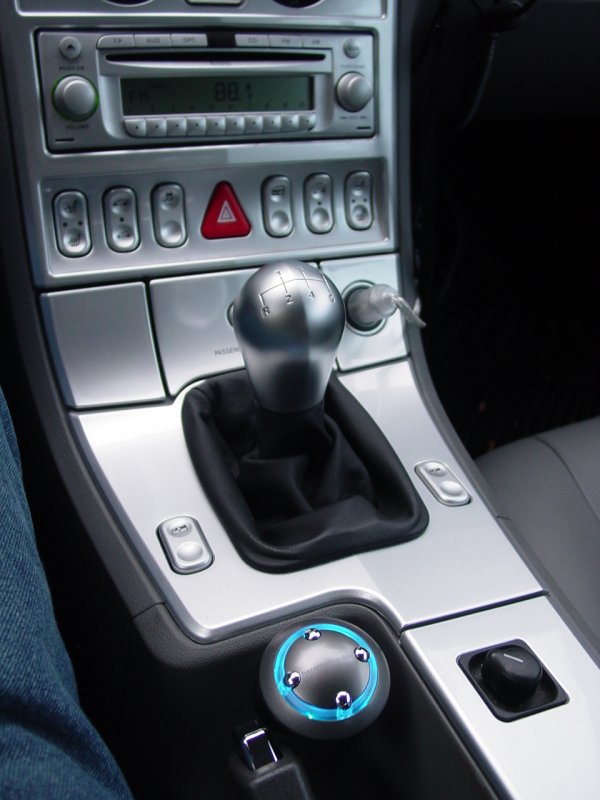
A single touch to the right button goes to the next song in whatever mode you're in - the next shuffled song if you're in shuffle mode, and the next song in order if you're in artist/album/genre mode.
It would be nice to have less gear but those two things would drive me nuts!
I guess the other thing that's nice about the harman-kardon is the support for another aux channel that is controlled by the **** - I run the XM through it, though I know there's an XM accessory for the Pioneer too. But I already had an XM tuner and it works plugged in direct (no FM modulation for me) so I think it's down to preference.
I loaded several shots of the Crossfire into the Pioneer display and from time to time switch to some of the other ones - have you tried the "vehicle dynamics" display with Tach, G-force etc stuff? Not sure it's really showing real-time data but it sure makes passengers think twice!
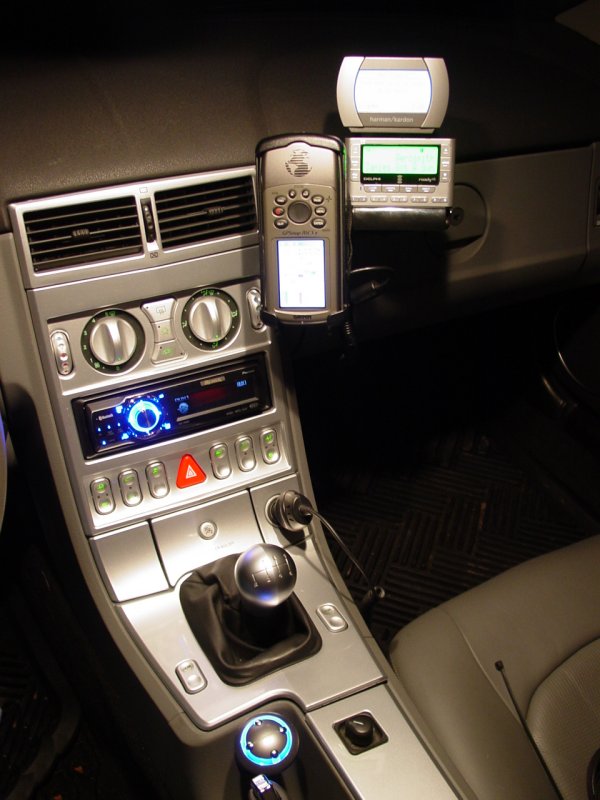
Here's the updated shot after I put in the Pioneer.
Last edited by ppro; Apr 5, 2008 at 12:46 PM.

Joined: Sep 2007
Posts: 49
Likes: 0
Re: Pioneer DEH-P980BT
To those who don't know- this unit comes with a line in jack; however it's wired to the back, so you have to run the cable somewhere. The ipod/sat radio add ons plug in easy, and there's always bluetooth. My new smartphone is capable of sending music to the unit wirelessly and there's adapters for ipods as well.
I did get this one as a catch all. I wanted the handsfree for calls more than the ipod connectivity, and since I always have my phone with me, I might find it use the BT music on my cell more than the iPod. I do like how nice it looks. It sucks to spend so much money and not get something that looks good. I looked hard at the similar model that is silver, but bluetooth was extra and the display was cheesy. I went into this purchase looking to minimize the extras, and I'm satisfied.
Anybody who has this headunit- have you played with the customizable screensaver/slideshows yet?
If anyone's got something crossfire-ish that looks good already done, I'll be willing to tip for your time. This unit comes with proprietary software I haven't taken the time to dive into yet...
One thing I do like, and maybe all the BT units do this, but I like seeing my cell reception "bars" on the display. Like I said, I just got a new phone, and I'm evaluating Sprint to see if the reception is as good as AT&T. I like that I can glance down as I'm doing my routine driving to make sure I'm going to be covered if I keep the phone.
About the vehicle dynamics- yeah, I did look at it, but it's kind of silly. It did get pretty accurate on the tach readings once I calibrated it, and it sure was nice to see my voltage levels, sure. It does impress passengers, sure.
I did get this one as a catch all. I wanted the handsfree for calls more than the ipod connectivity, and since I always have my phone with me, I might find it use the BT music on my cell more than the iPod. I do like how nice it looks. It sucks to spend so much money and not get something that looks good. I looked hard at the similar model that is silver, but bluetooth was extra and the display was cheesy. I went into this purchase looking to minimize the extras, and I'm satisfied.
Anybody who has this headunit- have you played with the customizable screensaver/slideshows yet?
If anyone's got something crossfire-ish that looks good already done, I'll be willing to tip for your time. This unit comes with proprietary software I haven't taken the time to dive into yet...
One thing I do like, and maybe all the BT units do this, but I like seeing my cell reception "bars" on the display. Like I said, I just got a new phone, and I'm evaluating Sprint to see if the reception is as good as AT&T. I like that I can glance down as I'm doing my routine driving to make sure I'm going to be covered if I keep the phone.
About the vehicle dynamics- yeah, I did look at it, but it's kind of silly. It did get pretty accurate on the tach readings once I calibrated it, and it sure was nice to see my voltage levels, sure. It does impress passengers, sure.
Last edited by JonZoidberg; Apr 6, 2008 at 06:38 PM.
Joined: Sep 2007
Posts: 49
Likes: 0
 Re: Pioneer DEH-P980BT
Another observation-
I commented way up in the thread that I didn't get good reception with the bluetooth mic- When I got my new phone- suddenly everyone I call hears me better!
The last one was a motorola flip phone that I just hated, and the new Samsung isn't getting complaints anymore. I thought nothing of it until 2 different people said it sounded better, and I can tell that what I hear is clearer too. I didn't think changing phones would help but it did.
It may be that it has an older BT protocol. My old phone would display my signal strength but not the battery level. The new one does both so maybe the software has improved.
I commented way up in the thread that I didn't get good reception with the bluetooth mic- When I got my new phone- suddenly everyone I call hears me better!
The last one was a motorola flip phone that I just hated, and the new Samsung isn't getting complaints anymore. I thought nothing of it until 2 different people said it sounded better, and I can tell that what I hear is clearer too. I didn't think changing phones would help but it did.
It may be that it has an older BT protocol. My old phone would display my signal strength but not the battery level. The new one does both so maybe the software has improved.
Thread Starter
|
Forum Regular
Joined: Sep 2007
Posts: 963
Likes: 2
Re: Pioneer DEH-P980BT
Originally Posted by JonZoidberg
Anybody who has this headunit- have you played with the customizable screensaver/slideshows yet?

Thread
Thread Starter
Forum
Replies
Last Post
pioneer4x4
Audio, Video and Electronics
12
Mar 18, 2021 02:17 PM
pioneer4x4
All Crossfires
22
Apr 17, 2016 10:26 AM
Currently Active Users Viewing This Thread: 1 (0 members and 1 guests)