


Speed Sensitive Volume ?


Forum Regular
Joined: Sep 2007
Posts: 234
Likes: 0
 Re: Speed Sensitive Volume ?
I have come to the conclusion that this feature does not exist on my 2006 base coupe. The volume never changes when I'm driving.
Do the base models have an amp? I do not believe they do.
I spent some time fooling with the radio in my base coupe. I was unable to find any options that would allow for a decible adjustment.
I tried many things in an effort to get a hidden menu option to appear. I tried pushing and holding buttons for a few seconds. I also tried pushing multiple buttons at the same time.
Do the base models have an amp? I do not believe they do.
I spent some time fooling with the radio in my base coupe. I was unable to find any options that would allow for a decible adjustment.
I tried many things in an effort to get a hidden menu option to appear. I tried pushing and holding buttons for a few seconds. I also tried pushing multiple buttons at the same time.

Joined: Sep 2007
Posts: 123
Likes: 1
From: Andover, MN
Re: Speed Sensitive Volume ?
I have the navigation unit and it does have the speed dependent variable volume adjustment. DELETE: I believe you press and hold the volume control for a few seconds and it enables the adjustment (a volume text message pops up on the screen). You then turn the volume control to adjust.
This might be available on the navigation units only???
EDIT:
WELLLLLLLLLLL, I went out and 'unwraped' the car to see if My memory was correct, it wasn't . I could adjust volume sepeately for TP (traffic program) and for navigation instructions. The speed sensitive volume control was way over on the radio in my wife's Ford Explorer, I guess that is where I remember it from......sorry....
This might be available on the navigation units only???
EDIT:
WELLLLLLLLLLL, I went out and 'unwraped' the car to see if My memory was correct, it wasn't
. I could adjust volume sepeately for TP (traffic program) and for navigation instructions. The speed sensitive volume control was way over on the radio in my wife's Ford Explorer, I guess that is where I remember it from......sorry....
Last edited by blue pearl; Mar 7, 2008 at 05:32 PM.

Forum Regular
Joined: Oct 2007
Posts: 413
Likes: 1
From: San Mateo, CA
Re: Speed Sensitive Volume ?
Me neither, I never notice any automatic volume adjustment on the radio. Maybe I'll try the trick that blue pearl suggest tonight and see what happens. Press and hold the volume control for a few seconds, but isn't that the power on/off buttom as well?
By the way, I notice the radio on all the GM's new vehicles are speed sensitive.
By the way, I notice the radio on all the GM's new vehicles are speed sensitive.
 .
.

Administrator / Senior Member / Retired
Joined: Jul 2007
Posts: 18,118
Likes: 1,604
From: Aurora , ILL
Re: Speed Sensitive Volume ?
I was out today just cruising around. The roads were dry and clean. I took off from a stoplight with the tunes on and sure enough at about 60 up to around 110 the volume did increase. I had never noticed it before probably because when I am running it hard I like to hear the engine and not the tunes. It is a subtle increase but it is there. I have a 04 Coupe by the way.


Forum Regular
Joined: Sep 2007
Posts: 963
Likes: 2
Re: Speed Sensitive Volume ?
It's documented in the installation guide for the Navigation Radio unit.
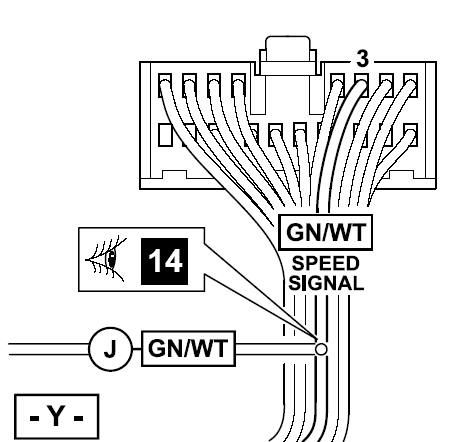
It's documented in the factory wiring diagram.
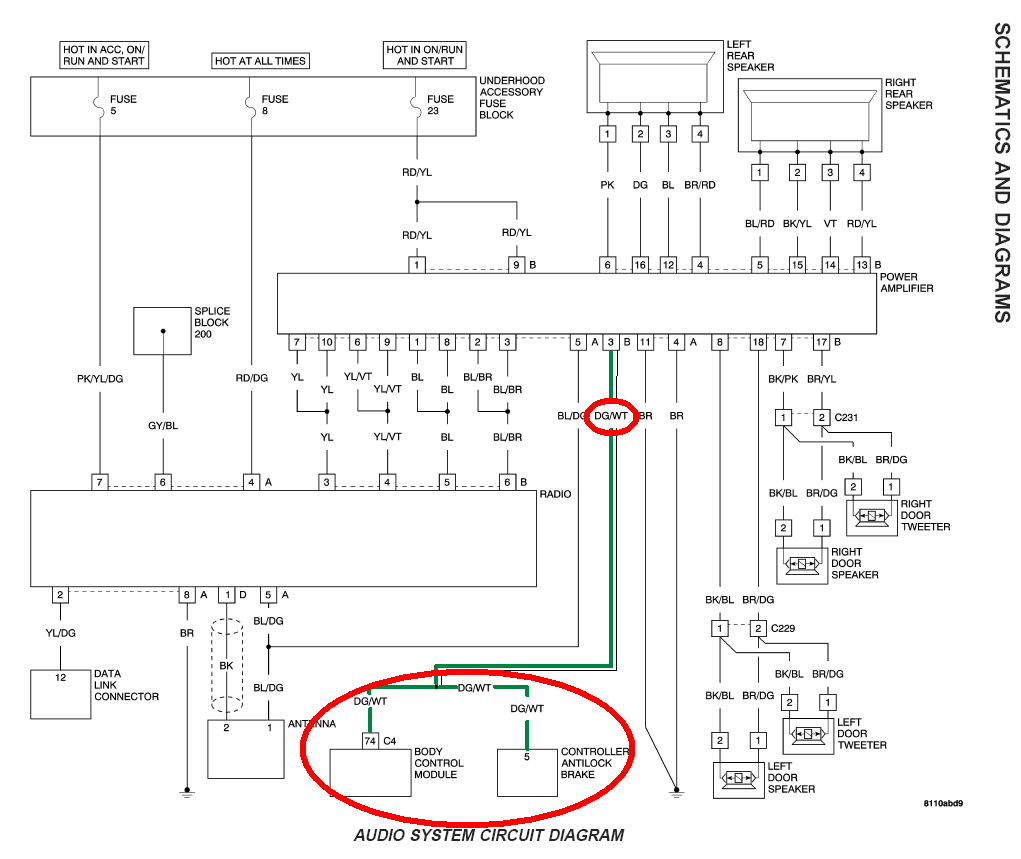
My 2004 (with aftermarket head unit) raises and lowers volume as speed changes (subtle).
I conclude that if signal from head unit goes through factory amp to factory speakers, and the signal from the body control module is working, the system raises and lowers volume in response to speed, and my car (2004 Coupe) does that.
It's documented in the factory wiring diagram.
My 2004 (with aftermarket head unit) raises and lowers volume as speed changes (subtle).
I conclude that if signal from head unit goes through factory amp to factory speakers, and the signal from the body control module is working, the system raises and lowers volume in response to speed, and my car (2004 Coupe) does that.

Forum Regular
Joined: Dec 2007
Posts: 392
Likes: 3
From: Rathdrum, Idaho
Re: Speed Sensitive Volume ?
Originally Posted by ppro
It's documented in the installation guide for the Navigation Radio unit.
It's documented in the factory wiring diagram.
It's documented in the factory wiring diagram.

Joined: Aug 2007
Posts: 264
Likes: 1
From: Dark Carnival
 Re: Speed Sensitive Volume ?
Do you know if this feature in any way impacts the equalizer in the amp?
I think I may have stumbled on the fix to my radio problem - now if only I could get the dealer to believe me....
I think I may have stumbled on the fix to my radio problem - now if only I could get the dealer to believe me....
Forum Regular
Joined: Sep 2007
Posts: 963
Likes: 2
Re: Speed Sensitive Volume ?
Originally Posted by Ringmaster
Do you know if this feature in any way impacts the equalizer in the amp?
I think I may have stumbled on the fix to my radio problem - now if only I could get the dealer to believe me....
I think I may have stumbled on the fix to my radio problem - now if only I could get the dealer to believe me....
I believe referring the dealer to the factory wiring charts, factory radio pin-out diagram, and factory amp pin-out diagrams should be enough to light the "DOH!" lamp in their head. I had to do that with them to get my factory amp replaced when it started going off for hours for no apparent reason.
At first they were going to have "some stereo guy down the street" replace it with an aftermarket stereo but then the stereo guy pointed out the MAP circuit and his belief that the wiring is fiber optic (well, not really) and the dealer ponied up for a new amp from the factory. Clowns! You have to be very persistent and know what you're talking about.
And don't waste time with the service writer - go to the ownership management chain. Be very professional, respectful, courteous, but firm. They don't want to lose that 5-star rating...
Forum Regular
Joined: Sep 2007
Posts: 963
Likes: 2
Re: Speed Sensitive Volume ?
Oh yeah - from my write-up on the Pioneer install... The radio pin-outs and wiring numbering charts - factory diagram from the Becker factory radio manual. The chart is developed from the same source.
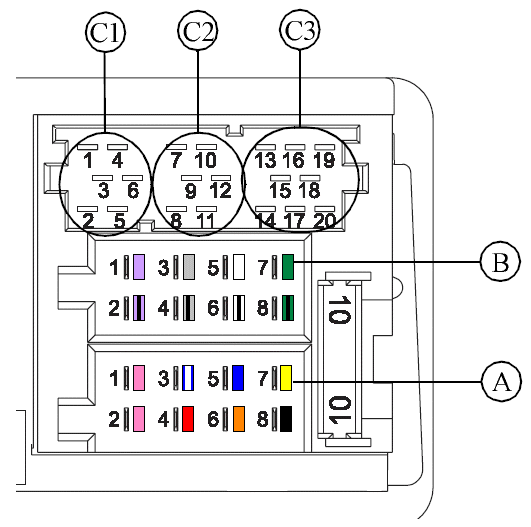
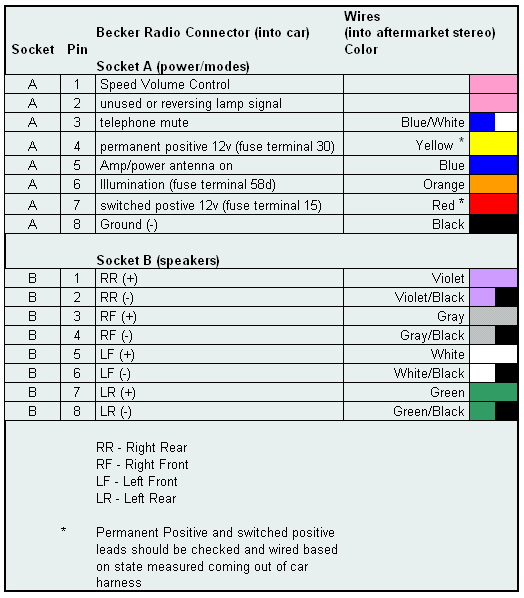
Factory documentation - what's left to say?
Factory documentation - what's left to say?

Joined: Aug 2007
Posts: 115
Likes: 1
Re: Speed Sensitive Volume ?
I changed to an aftermarket head unit last week and the speed sensing volume has just gotten worse. Not only does it adjust the volume, but it plays with the treble as well.
Anyone know how I can disconnect it at the amplifier? It must be at the amp because my head unit doesn't have that feature, nor does any wire come out of it that would influence it.
Thanks
Anyone know how I can disconnect it at the amplifier? It must be at the amp because my head unit doesn't have that feature, nor does any wire come out of it that would influence it.
Thanks

Thread
Thread Starter
Forum
Replies
Last Post
jimf
Troubleshooting & Technical Questions & Modifications
11
Oct 10, 2015 10:22 AM
Currently Active Users Viewing This Thread: 1 (0 members and 1 guests)