


auxilary input jack


Thread Starter
Joined: Aug 2010
Posts: 23
Likes: 0
 auxilary input jack
Just purchased a 2008 convertible with NAV. Does this radio have an auxiliary input jack for an ipod or mp3 player? Or something simple to get a direct connection?
Last edited by AlphaTrion; Aug 24, 2010 at 07:25 PM.
 Re: auxillary input jack
Originally Posted by AlphaTrion
Just purchased a 2008 convertible with NAV. Does this radio have an auxiliary input jack for an ipod or mp3 player? Or something simple to get a direct connection?
Any aux cable made for a Blaupunkt stereo equipped with a CD changer should work. - just not sure if the NAV OEM radio allows for an AUX in "vice the CD changer"
If not - I like this little puppy that I'm adding to my OEM "German" Becker unit I just purchased. Also allows for a Bluetooth adapter.
Just waiting for my gear to arrive from Germany...
Last edited by BrianBrave; Aug 24, 2010 at 09:52 PM.

Senior Member
Joined: Apr 2006
Posts: 25,432
Likes: 648
From: Ontario
Re: auxillary input jack
Originally Posted by AlphaTrion
Just purchased a 2008 convertible with NAV. Does this radio have an auxiliary input jack for an ipod or mp3 player? Or something simple to get a direct connection?
https://www.crossfireforum.org/forum...adio-here.html

Senior Member
Joined: Apr 2008
Posts: 3,178
Likes: 24
From: Chicago, IL
 Re: auxillary input jack
Originally Posted by BrianBrave
Solisto makes an aux input cable.
Any aux cable made for a Blaupunkt stereo equipped with a CD changer should work. - just not sure if the NAV OEM radio allows for an AUX in "vice the CD changer"
If not - I like this little puppy that I'm adding to my OEM "German" Becker unit I just purchased. Also allows for a Bluetooth adapter.
Just waiting for my gear to arrive from Germany...
Any aux cable made for a Blaupunkt stereo equipped with a CD changer should work. - just not sure if the NAV OEM radio allows for an AUX in "vice the CD changer"
If not - I like this little puppy that I'm adding to my OEM "German" Becker unit I just purchased. Also allows for a Bluetooth adapter.
Just waiting for my gear to arrive from Germany...
Re: auxillary input jack
Originally Posted by rcompart
Brian, you need to go back and do some homework my friend as the blaupunkt auxiliary inputs do not work with our factory nav radios. As far as the zemex unit, without someone actually hooking it up, no way to know if the firmware on the factory nav radio will play nice with it. I know it took some work to make mine work with our radio so it would be a safe bet that this one would as well.
Did my homework (I always do) - I'm going with a new Becker head unit for MB's (actually it's NOS) that looks 100% OEM, is completely plug-n-play with our factory units - but has 4 channel stereo output along with 5 pre-amps (front, rear, subwoofer) phone input and mute, CD that plays MP3's etc.. CD changer, AUX in, RDS, 5 EQ settings, bass boost, etc..
I also got a deal on the Zemex unit with a bluetooth adapter that controls and displays both Pod functions and iPhone.
If someone local with a factory Nav system wants to test the Zemex/Bluetooth compatibility - I'll be glad to...

Senior Member
Joined: Dec 2005
Posts: 1,564
Likes: 2
From: Georgia
Re: auxillary input jack
Originally Posted by BrianBrave
As I posted - just not sure if the NAV OEM radio allows for an AUX in "vice the CD changer"....
Did my homework (I always do) - I'm going with a new Becker head unit for MB's (actually it's NOS) that looks 100% OEM, is completely plug-n-play with our factory units - but has 4 channel stereo output along with 5 pre-amps (front, rear, subwoofer) phone input and mute, CD that plays MP3's etc.. CD changer, AUX in, RDS, 5 EQ settings, bass boost, etc..
I also got a deal on the Zemex unit with a bluetooth adapter that controls and displays both Pod functions and iPhone.
If someone local with a factory Nav system wants to test the Zemex/Bluetooth compatibility - I'll be glad to...
Did my homework (I always do) - I'm going with a new Becker head unit for MB's (actually it's NOS) that looks 100% OEM, is completely plug-n-play with our factory units - but has 4 channel stereo output along with 5 pre-amps (front, rear, subwoofer) phone input and mute, CD that plays MP3's etc.. CD changer, AUX in, RDS, 5 EQ settings, bass boost, etc..
I also got a deal on the Zemex unit with a bluetooth adapter that controls and displays both Pod functions and iPhone.
If someone local with a factory Nav system wants to test the Zemex/Bluetooth compatibility - I'll be glad to...
Re: auxillary input jack
Originally Posted by 04Fire
Brian what Mercedes (Becker) radio are you looking at?
I purchased a Becker 7885 on Ebay Germany... Black face - Blue display...
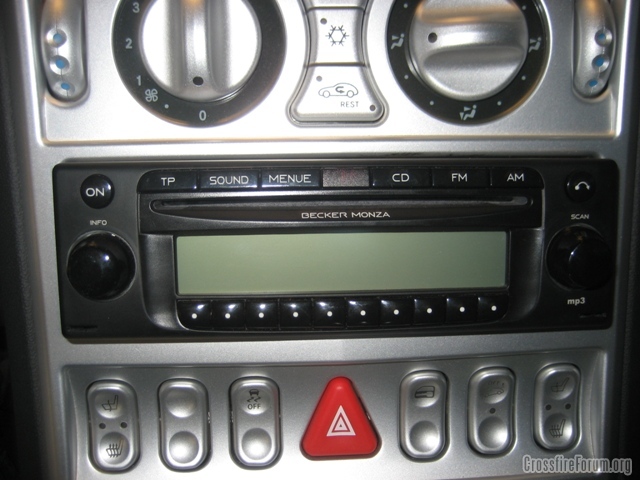
I discovered that if any Becker or Blaupunkt head unit that will control a Becker 2660 or compatible CD changer - then there are so many options for adapting an iPod or iPhone to the unit.. This is also true for the factory NAV HU - but my SRT6 was not equipped with Factory Nav - nor did I want to buy one.
So - I swaped the face plate from my stock silver HU with the one shown above (way to easy) and unsoldered the blue LED's behind the display and replaced with the green LED's from my factory unit (a lot more work) but other then that and an antenna adapter it was plug and play.
Now I have 4 channel sound Socket B - (with additional amp and wires) - and much more dynamic range and control (the bass is incredible) I hooked up an iPad/iPhone adapter to the CD Changer socket C2 & C3 for under $125 that I can control from the H/U and keeps my iPhone charged -
I now have phone input, Socket C3 and mute on Socket A, for my bluetooth device for handsfree calling that I hear thru the speakers... 5 channel pre-amp output (socket C1), (front, rear, sub-woofer) Traffic info, RDS, MP3, GAL, SW radio, Track display (song, artist) from the CD Rom, etc...
And it looks so factory...... Perhaps I should do a full write up..

Last edited by BrianBrave; Feb 3, 2011 at 03:45 AM.


Senior Member
Joined: Apr 2006
Posts: 25,432
Likes: 648
From: Ontario
Re: auxilary input jack
Great job and I have to ask a question of you. Can I change the face plate from my non Nav Becker to my Nav Becker. Presumably the answer is yes. My non Nav faceplate is unmarked and the other has a few scratches. I'm assuming the black blank plug can be removed and have the button replace it.
I looked and after being told it was a risky operation I dropped the idea.
I have the 2660 CD changer and would like to add the phone option to the system eventually, that can be done according to the write ups but I did not find any parts to enable it to be done.
How do you get the face plate off?
So do the write up and let us all learn from your endeavors - please.
I looked and after being told it was a risky operation I dropped the idea.
I have the 2660 CD changer and would like to add the phone option to the system eventually, that can be done according to the write ups but I did not find any parts to enable it to be done.
How do you get the face plate off?
So do the write up and let us all learn from your endeavors - please.
Re: auxilary input jack
Originally Posted by onehundred80
Great job and I have to ask a question of you. Can I change the face plate from my non Nav Becker to my Nav Becker. Presumably the answer is yes. My non Nav faceplate is unmarked and the other has a few scratches. I'm assuming the black blank plug can be removed and have the button replace it.
I looked and after being told it was a risky operation I dropped the idea.
I looked and after being told it was a risky operation I dropped the idea.
You can't swap the display or the electronics as they are different and model specific.
Originally Posted by onehundred80
I have the 2660 CD changer and would like to add the phone option to the system eventually, that can be done according to the write ups but I did not find any parts to enable it to be done.
Originally Posted by onehundred80
How do you get the face plate off?
So do the write up and let us all learn from your endeavors - please.
So do the write up and let us all learn from your endeavors - please.
You will see two small torqs screws. Remove them and the rest is all plastic clips (bottom and sides). Just be careful and patient and don't damage the display or electronics.
Good Luck.


Senior Member
Joined: Apr 2006
Posts: 25,432
Likes: 648
From: Ontario
Re: auxilary input jack
The socket C3 has telephone inputs and socket A has telephone mute on it. The Nav manual mentions telephone usage.
Do the buttons come out with the face plate and if so can they be placed on the non nav face plate?
The face plates look identical.
Do the buttons come out with the face plate and if so can they be placed on the non nav face plate?
The face plates look identical.
Last edited by onehundred80; Feb 3, 2011 at 01:43 PM.
Senior Member
Joined: Dec 2005
Posts: 1,564
Likes: 2
From: Georgia
Re: auxilary input jack
Brian, That's an awesome write up! I found a previous thread where it went through some of the details: https://www.crossfireforum.org/forum...-interest.html
And for those interested here's a link to more info on the Becker Monza: Becker Model BE 788x Monza
Also notice that they make one with a green display model # 7889
So far the only one's I've been able to find are over $550... and seem to only have a white display (7882) So if anyone finds them anywhere feel free to post.

http://docs.google.com/viewer?a=v&q=...vB-OXogGUoyUrg
And for those interested here's a link to more info on the Becker Monza: Becker Model BE 788x Monza
Also notice that they make one with a green display model # 7889
So far the only one's I've been able to find are over $550... and seem to only have a white display (7882) So if anyone finds them anywhere feel free to post.
http://docs.google.com/viewer?a=v&q=...vB-OXogGUoyUrg
Last edited by 04Fire; Feb 4, 2011 at 02:40 PM.
Re: auxilary input jack
Originally Posted by 04Fire
Brian, That's an awesome write up! I found a previous thread where it went through some of the details: https://www.crossfireforum.org/forum...-interest.html
And for those interested here's a link to more info on the Becker Monza: Becker Model BE 788x Monza
Also notice that they make one with a green display model # 7889
So far the only one's I've been able to find are over $550... and seem to only have a white display (7882) So if anyone finds them anywhere feel free to post.
And for those interested here's a link to more info on the Becker Monza: Becker Model BE 788x Monza
Also notice that they make one with a green display model # 7889
So far the only one's I've been able to find are over $550... and seem to only have a white display (7882) So if anyone finds them anywhere feel free to post.
There's a few on eBay.de for cheap - just search "Becker Monza" and wade thru some of the older models.
I had to convince the seller how cheap it was to ship to the USA. A simple export form at the German Post Office (DHL) and around 20 euros. The US post office delivers DHL letters/packages from Germany right to your door.
I even returned a defective Bluetooth interface to Germany VIA the US mail for $3.75. It arrived in Germany 5 days later.
Senior Member
Joined: Dec 2005
Posts: 1,564
Likes: 2
From: Georgia
Re: auxilary input jack
I just wanted to personally thank Brian (BrianBrave) for all his help in my quest to duplicate his install. Thanks to Brain it was relatively painless.... and felt his hard work shouldn't go unnoticed.
And for those of you who need a little help swapping the face plates here's the D.I.Y. Brian sent me:
Took my old radio apart to take some pictures and remember how I did it.
First, remove the 4 small torq screws on the back

Second, carefully twist the small tabs on the bottom so they are straight.

Make sure the two large ***** on the front of the unit (volume and tune) are removed, then simply (but carefully) pull the face plate off.
There are two tabs on each side that you will need to slide of the keepers....

In the next picture you will see two long snap-in guides that fit/snap into the PC board.
(This was the hard part for me as they were pretty snug and you need only pry gently near them to get the faceplate separated from the back.)

Carefully pulling on the faceplate while holding the PC board (after sliding the side keepers off) will remove the faceplate from the circuit board.
Re-assemble in reverse order with the silver faceplate and *****, noting that there is soft recoil plastic (the white guy in picture #3) between the top row of buttons on the faceplate and the switches on the PCB that will need to be alighned - But you will see that.
And for those of you who need a little help swapping the face plates here's the D.I.Y. Brian sent me:
Took my old radio apart to take some pictures and remember how I did it.
First, remove the 4 small torq screws on the back
Second, carefully twist the small tabs on the bottom so they are straight.
Make sure the two large ***** on the front of the unit (volume and tune) are removed, then simply (but carefully) pull the face plate off.
There are two tabs on each side that you will need to slide of the keepers....
In the next picture you will see two long snap-in guides that fit/snap into the PC board.
(This was the hard part for me as they were pretty snug and you need only pry gently near them to get the faceplate separated from the back.)
Carefully pulling on the faceplate while holding the PC board (after sliding the side keepers off) will remove the faceplate from the circuit board.
Re-assemble in reverse order with the silver faceplate and *****, noting that there is soft recoil plastic (the white guy in picture #3) between the top row of buttons on the faceplate and the switches on the PCB that will need to be alighned - But you will see that.

Joined: Mar 2014
Posts: 213
Likes: 0
From: First Capital, Upper Canada
Re: auxilary input jack
Where can I source the harness with rca pre amp outs shown below? Upgrading the audio system without replacing the headunit as I like the factory look.
I could use a Bit One or similar but that will be my last resort.
I could use a Bit One or similar but that will be my last resort.
Yes, with a little patience you can "swap" the plastic covers, the ***** and buttons between the radios.
You can't swap the display or the electronics as they are different and model specific.
No - you need a complete new radio model for that, which means you will loose Nav but gain the other functions.
Remove the radio from the car. Remove the top cover - it just slides up.
You will see two small torqs screws. Remove them and the rest is all plastic clips (bottom and sides). Just be careful and patient and don't damage the display or electronics.
Good Luck.
You can't swap the display or the electronics as they are different and model specific.
No - you need a complete new radio model for that, which means you will loose Nav but gain the other functions.
Remove the radio from the car. Remove the top cover - it just slides up.
You will see two small torqs screws. Remove them and the rest is all plastic clips (bottom and sides). Just be careful and patient and don't damage the display or electronics.
Good Luck.

Senior Member
Joined: Oct 2013
Posts: 2,006
Likes: 15
From: Southern IL.
I installed my Kenwood last week and love the look of in in XFire, lots of silver and got display color to match dash. Looks better then factory IMO.
Can't get pic to load but look at the thread I posted last week has pics
Can't get pic to load but look at the thread I posted last week has pics

Thread
Thread Starter
Forum
Replies
Last Post
rampntlion
Engine, Exhaust, Transmission and Differential
21
Feb 11, 2019 08:18 AM
RED DOG
-C-I-C-C-I Discussion
1
Oct 8, 2015 09:28 AM
ritous1
Wheels, Brakes, Tires and Suspension
6
Sep 26, 2015 01:27 PM
Currently Active Users Viewing This Thread: 1 (0 members and 1 guests)


